Screenshot style breakdown
Sampled from 5 of 这就是功夫 - 特工打怪割草大作战's App Store screenshots — background, accent and theme, measured by LaunchShots (not something Apple publishes).
#F48404 bg
#D67403
#FCE404 accent
#111111 text
Screenshots

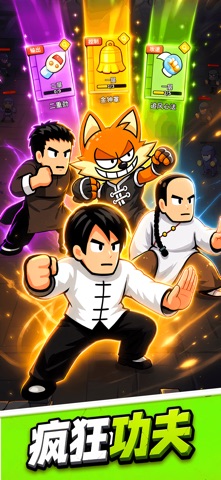

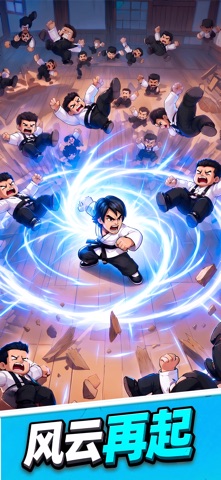

Icon palette
About this app
感受拳拳到肉的打击感,体验策略与休闲的完美结合!身处危机四伏的武林,你将化身一代宗师,坚守阵地,以一当百,击溃源源不断的敌人!无需复杂操作,轻松上手,尽享自动攻击的爽快! 核心特色: 中心固守,轻松休闲: 告别繁琐走位,策略搭配技能与属性,守护你的武馆! 肉鸽功法,百变组合: 击败强敌,获取武功秘籍,主动、被动、辅助技能,每次都是独一无二的build体验! 双重养成,武力飞升: 局内糖果助力,临时提升战力;局外金币、钻石强化角色,解锁更多技能,抽取常驻功法,打造你的专属功夫大师! 多元挑战,层层突破: 主线关卡与无尽模式,考验你的功法搭配与角色培养,挑战极限,不断突破自我! 简约像素,轻松上手: 简约卡通像素风,上手门槛低,随时随地体验功夫的乐趣! 更多精彩: 活动奖励、成就系统,海量资源助力成长! 不断更新的关卡与挑战,让你永远保持新鲜感! 准备好迎接挑战了吗?来证明你的功夫吧!
App details
What you can learn from 这就是功夫 - 特工打怪割草大作战
Every shipping app on the App Store has gone through the same decisions you're working through right now: which screenshot goes first, what caption sits over it, which device frame to show, what color the background should be. The 5 screenshots above are 这就是功夫 - 特工打怪割草大作战's answers to those questions — they're public, they're real, and they made it through Apple's review.
What the numbers say: 这就是功夫 - 特工打怪割草大作战 runs a mixed light-and-dark set where the background shifts from screenshot to screenshot (first shot #F48404) — each image has to stand on its own, so the captions carry more of the story. The accent colour we picked up, #FCE404, is the one to reuse for badges, arrows and highlighted words if you borrow this look. Hit Use this style to open the editor with these exact colours and drop your own screenshot in.
Notice the first screenshot in particular. It's the one users see in search results and on the product page, and it's where most apps spend their best caption and tightest design. Look at the proportion of background to phone, where the text sits, what one thing the image is trying to communicate.
Want to see how other Games apps approach the same problem? Browse more Games apps in the showcase.
Take what works into your own screenshots
Open LaunchShots and design your App Store & Google Play screenshots — pick a device frame, drop captions, ship in minutes. Free, in your browser.
Open the screenshot editor →Apps with a similar look
Closest background + accent colours among the listings we've analysed — useful when you want to see the same palette handled by a different team.