Chart position — tracked daily by LaunchShots
Screenshot changes — detected by LaunchShots
Screenshot style breakdown
Sampled from 5 of ギターコードブック's App Store screenshots — background, accent and theme, measured by LaunchShots (not something Apple publishes).
#FCF4EC bg
#DDD6CF
#8C5C2C accent
#111111 text
Screenshots


iPad screenshots


Icon palette
About this app
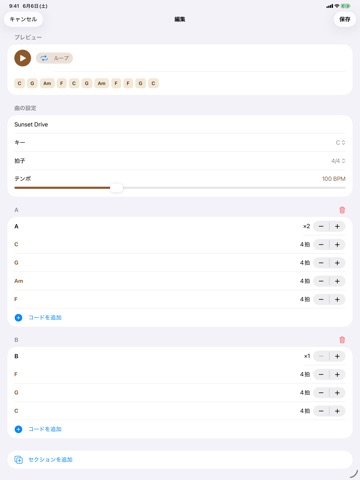
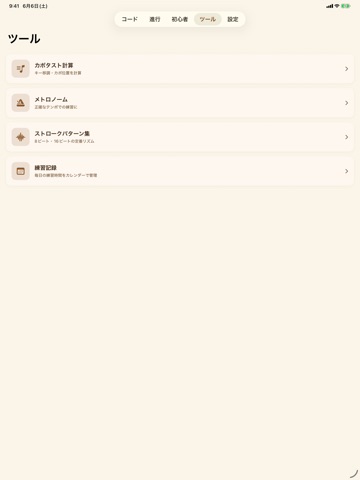
「ギターコードブック」は、コードを「調べる・鳴らす・作る」が1つになったギター辞典&練習アプリです。 【370以上のコードを瞬時に引ける】 ルート12音 × 31タイプ(メジャー、マイナー、7th、M7、m7、6、m6、sus4、add9、dim、aug、テンション系の 7(9) / 7(b9) / 7(#9) / 7(13) / M7(13) / m7(11) など)を完全網羅。ルートとタイプを選ぶだけで押さえ方が即表示。1つのコードに複数のポジション(ボイシング)を収録し、ネック上の別の押さえ方もすぐ確認できます。 【タップで音が鳴る】 リアルなギター音源を内蔵。コードを選ぶたびに音が鳴り、耳で覚えられます。各ボイシングごとの響きの違いも聴き比べできます。 【コード進行を自動再生】 王道進行・カノン進行・小室進行・ii-V-I・12小節ブルースなど定番の進行を多数収録。テンポを変えて自動再生でき、再生中のコードがハイライトされるので耳と目で覚えられます。 【作曲機能(マイソング)】 好きなコードを並べ、テンポ・拍子・セクション・繰り返しを設定して、自分だけの進行を作成・保存。…
App details
What you can learn from ギターコードブック
Every shipping app on the App Store has gone through the same decisions you're working through right now: which screenshot goes first, what caption sits over it, which device frame to show, what color the background should be. The 10 screenshots above are ギターコードブック's answers to those questions — they're public, they're real, and they made it through Apple's review.
What the numbers say: ギターコードブック runs a light set with one background colour (#FCF4EC) carried across every screenshot — the listing reads as a single poster when the shots sit side by side in search results. The accent colour we picked up, #8C5C2C, is the one to reuse for badges, arrows and highlighted words if you borrow this look. Hit Use this style to open the editor with these exact colours and drop your own screenshot in.
Notice the first screenshot in particular. It's the one users see in search results and on the product page, and it's where most apps spend their best caption and tightest design. Look at the proportion of background to phone, where the text sits, what one thing the image is trying to communicate.
Want to see how other Reference apps approach the same problem? Browse more Reference apps in the showcase.
Take what works into your own screenshots
Open LaunchShots and design your App Store & Google Play screenshots — pick a device frame, drop captions, ship in minutes. Free, in your browser.
Open the screenshot editor →Apps with a similar look
Closest background + accent colours among the listings we've analysed — useful when you want to see the same palette handled by a different team.