Chart position — tracked daily by LaunchShots
Screenshot style breakdown
Sampled from 6 of 秒变发型-Ai百变造型设计's App Store screenshots — background, accent and theme, measured by LaunchShots (not something Apple publishes).
#B4DCF4 bg
#9EC1D6
#3CACE4 accent
#111111 text
Screenshots




Icon palette
About this app
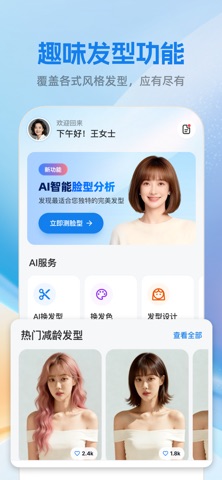
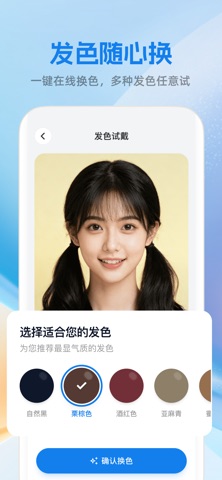
秒变发型 – AI换发型换发色 还在纠结下次剪什么发型?想换发色又怕后悔?「秒变发型」帮你提前试遍千款造型,0成本找到最适合自己的那一款。 ※ 核心功能亮点 ※ ▶ AI脸型分析 上传照片,智能算法精准识别脸型,并给出科学的美发建议,让你不再盲目跟风。 ▶ 百变发型库 从甜美锁骨发到干练短发,从慵懒卷发到潮流脏辫,海量风格应有尽有,一键试戴,秒看效果。 ▶ 发色随心换 内置丰富发色谱系,奶茶棕、黑茶色等等,颜色自然逼真,想换就换,直到找到心仪的那一个。 不用剪发,不用染发,动动手指就能遇见更好看的自己。 下载「秒变发型」,开启你的百变造型之旅。 加入会员,解锁全量高级功能。相关会员说明: 订阅方案: 周会员: ¥48/周(自动续订) 年会员: ¥198/年(自动续订) 续订规则: 订阅到期前 24 小时内,系统将通过您的 Apple ID 账户自动扣费并延长有效期。 管理与取消: 您可随时关闭自动续订。请前往 iOS 设备 [设置] > [iTunes 与 App Store] > 点击 [Apple ID] > [查看订阅],找到本服务并关闭即可。 权益说明: 取消续订后,您的会员权限将保留…
App details
What you can learn from 秒变发型-Ai百变造型设计
Every shipping app on the App Store has gone through the same decisions you're working through right now: which screenshot goes first, what caption sits over it, which device frame to show, what color the background should be. The 6 screenshots above are 秒变发型-Ai百变造型设计's answers to those questions — they're public, they're real, and they made it through Apple's review.
What the numbers say: 秒变发型-Ai百变造型设计 runs a light set where the background shifts from screenshot to screenshot (first shot #B4DCF4) — each image has to stand on its own, so the captions carry more of the story. The accent colour we picked up, #3CACE4, is the one to reuse for badges, arrows and highlighted words if you borrow this look. Hit Use this style to open the editor with these exact colours and drop your own screenshot in.
Notice the first screenshot in particular. It's the one users see in search results and on the product page, and it's where most apps spend their best caption and tightest design. Look at the proportion of background to phone, where the text sits, what one thing the image is trying to communicate.
Want to see how other Graphics & Design apps approach the same problem? Browse more Graphics & Design apps in the showcase.
Take what works into your own screenshots
Open LaunchShots and design your App Store & Google Play screenshots — pick a device frame, drop captions, ship in minutes. Free, in your browser.
Open the screenshot editor →Apps with a similar look
Closest background + accent colours among the listings we've analysed — useful when you want to see the same palette handled by a different team.