Chart position — tracked daily by LaunchShots
Screenshot style breakdown
Sampled from 4 of Goodnotes极速版's App Store screenshots — background, accent and theme, measured by LaunchShots (not something Apple publishes).
#4CBCDC bg
#42A5C1
#3464A4 accent
#111111 text
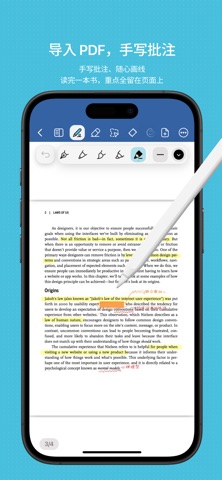
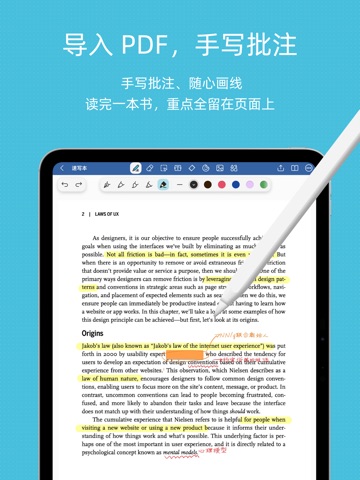
- #3导入 PDF, 手 写 批注 读 完 一 本 书 , 重 点 全 留 在 页 面 上
- #4笔记 同步 , 数 据 安全 不 丢失
Captions read from the screenshots (OCR, may contain small errors): 2 headlines, 13.5 words on average (longest 19), mostly ALL CAPS.
Screenshots



iPad screenshots


Icon palette
About this app
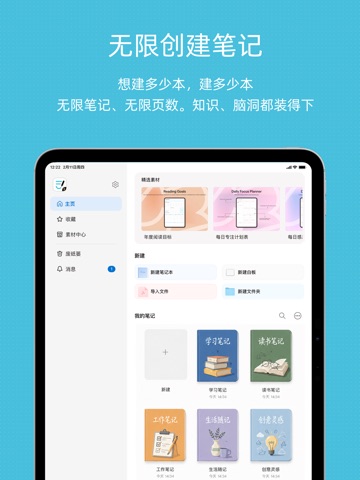
Goodnotes 极速版,让手写笔记回归纸张般的自然手感,又有数字笔记的自由与便捷。无论是课堂笔记、读书笔记、会议记录还是考研笔记,打开就能写,灵感随手就记。 【真实书写,越写越好看】 超真实的笔触手感,落笔顺滑自然,写出来的字干净好看。多款笔刷、荧光笔、橡皮自由切换,配合套索、贴纸等实用工具,让你高效做出漂亮的手写笔记。 【无限画布,笔记本永远写不满】 无限纸张自由延展,想写多少写多少,一页装下整堂课、整本书的思路,灵感再多也装得下。无需新建一页又一页,自由书写不打断。 【秒开 PDF,随手批注划重点】 快速打开并阅读 PDF,直接在文档上批注、标记和高亮,重点一目了然。PDF 阅读、PDF 标注、划重点一站搞定,是阅读和做读书笔记的好帮手。 【云端自动备份,数据安全不丢失】 笔记自动云同步,在不同设备上随时查看和续写,换设备也不怕丢,让你专注记录、放心书写。 【多场景随身记】 学习笔记、课堂笔记、读书笔记、会议记录、考研笔记、日常手帐……一个 App 满足你所有记录需求,让记笔记这件事简单又顺手。 免费畅享无限笔记,开…
App details
What you can learn from Goodnotes极速版
Every shipping app on the App Store has gone through the same decisions you're working through right now: which screenshot goes first, what caption sits over it, which device frame to show, what color the background should be. The 8 screenshots above are Goodnotes极速版's answers to those questions — they're public, they're real, and they made it through Apple's review.
What the numbers say: Goodnotes极速版 runs a light set with one background colour (#4CBCDC) carried across every screenshot — the listing reads as a single poster when the shots sit side by side in search results. The accent colour we picked up, #3464A4, is the one to reuse for badges, arrows and highlighted words if you borrow this look. Hit Use this style to open the editor with these exact colours and drop your own screenshot in.
Notice the first screenshot in particular. It's the one users see in search results and on the product page, and it's where most apps spend their best caption and tightest design. Look at the proportion of background to phone, where the text sits, what one thing the image is trying to communicate.
Want to see how other Productivity apps approach the same problem? Browse more Productivity apps in the showcase.
Take what works into your own screenshots
Open LaunchShots and design your App Store & Google Play screenshots — pick a device frame, drop captions, ship in minutes. Free, in your browser.
Open the screenshot editor →Apps with a similar look
Closest background + accent colours among the listings we've analysed — useful when you want to see the same palette handled by a different team.