Chart position — tracked daily by LaunchShots
Screenshot changes — detected by LaunchShots
Screenshot style breakdown
Sampled from 6 of Phone Guard: Clean & Protect's App Store screenshots — background, accent and theme, measured by LaunchShots (not something Apple publishes).
#2C44FC bg
#495EFC
#3CA4FC accent
#FFFFFF text
Reading the caption text from the screenshots in your browser…
Screenshots




Icon palette
About this app
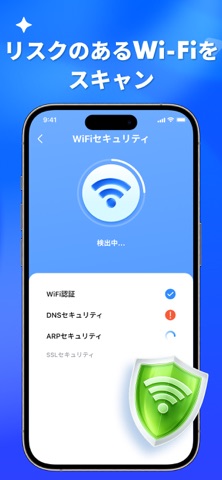
「ストレージ容量が不足しています」という警告にうんざりしていませんか?誰かがあなたの Wi-Fi を監視しているのではないか、またはパスワードが本当に安全なのか不安ではありませんか?散らかった写真ライブラリから隠れたネットワーク脅威まで、最も一般的なモバイルの悩みを分析し、その解決策を洗練された高性能ダッシュボードにまとめました。 最適化:スマートメディア整理 -スマートメディア整理:大容量動画や重複写真を素早く検出して削除。 -連絡先整理:重複した連絡先を簡単に統合し、リストを整理。 -カレンダー整理:期限切れのイベントや古い項目を数秒で削除。 当社の高精度エンジンが不要なデータを識別し、デバイスを常に最高のパフォーマンスで維持します。 保護:高度なデバイスセキュリティ -ハードウェアモニター:CPU負荷、RAM使用量、ストレージ状態をリアルタイムで監視。 -プライバシーボルト:機密性の高い写真や動画を保護する暗号化シークレットスペース。 -ネットワーク監査:不正アクセスを検出するプロフェッショナルな Wi-Fi セ…
App details
What you can learn from Phone Guard: Clean & Protect
Every shipping app on the App Store has gone through the same decisions you're working through right now: which screenshot goes first, what caption sits over it, which device frame to show, what color the background should be. The 9 screenshots above are Phone Guard: Clean & Protect's answers to those questions — they're public, they're real, and they made it through Apple's review.
What the numbers say: Phone Guard: Clean & Protect runs a mixed light-and-dark set where the background shifts from screenshot to screenshot (first shot #2C44FC) — each image has to stand on its own, so the captions carry more of the story. The accent colour we picked up, #3CA4FC, is the one to reuse for badges, arrows and highlighted words if you borrow this look. Hit Use this style to open the editor with these exact colours and drop your own screenshot in.
Notice the first screenshot in particular. It's the one users see in search results and on the product page, and it's where most apps spend their best caption and tightest design. Look at the proportion of background to phone, where the text sits, what one thing the image is trying to communicate.
Want to see how other Utilities apps approach the same problem? Browse more Utilities apps in the showcase.
Take what works into your own screenshots
Open LaunchShots and design your App Store & Google Play screenshots — pick a device frame, drop captions, ship in minutes. Free, in your browser.
Open the screenshot editor →Apps with a similar look
Closest background + accent colours among the listings we've analysed — useful when you want to see the same palette handled by a different team.