Chart position — tracked daily by LaunchShots
Screenshot style breakdown
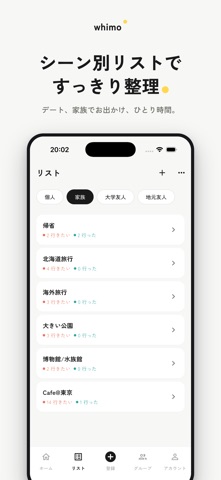
Sampled from 6 of SNSの行きたい場所を保存・共有|Whimo(ウィモ)'s App Store screenshots — background, accent and theme, measured by LaunchShots (not something Apple publishes).
#F4F4F4 bg
#D6D6D6
#64742C accent
#111111 text
Screenshots



Icon palette
About this app
気になったお店、あちこちに保存して散らばっていませんか? Instagram / TikTok の投稿も、Googleマップの保存場所も、Whimo(ウィモ)にまとめて取り込み。行きたい/行ったをひとつで管理できます。一人でも、家族・カップル・友達のグループでも、「今日どこ行く?」を最短で決められるお出かけ メモアプリです。 ■こんな人におすすめ ・Instagram / TikTokで「行きたい」と思った投稿が、保存フォルダに溜まりっぱなし ・Googleマップの保存場所が増えすぎて整理できていない ・気になるカフェやお店をメモするけれど、いざ出かけるとき思い出せない ・週末や記念日に「どこ行こう?」で毎回悩んでしまう ・家族やパートナーと「行きたいリスト」を共有したい ■できること ▼Instagram / TikTokの投稿から、お店をまるごと取り込み 気になったお店の投稿やリールを、Whimo(ウィモ)に共有するだけ。キャプションや位置情報からお店を自動で見つけ出し、写真・住所・カテゴリ付きで登録できます。スクショして後から探し直す手間は、もう不要です。 ▼Googl…
App details
What you can learn from SNSの行きたい場所を保存・共有|Whimo(ウィモ)
Every shipping app on the App Store has gone through the same decisions you're working through right now: which screenshot goes first, what caption sits over it, which device frame to show, what color the background should be. The 6 screenshots above are SNSの行きたい場所を保存・共有|Whimo(ウィモ)'s answers to those questions — they're public, they're real, and they made it through Apple's review.
What the numbers say: SNSの行きたい場所を保存・共有|Whimo(ウィモ) runs a light set with one background colour (#F4F4F4) carried across every screenshot — the listing reads as a single poster when the shots sit side by side in search results. The accent colour we picked up, #64742C, is the one to reuse for badges, arrows and highlighted words if you borrow this look. Hit Use this style to open the editor with these exact colours and drop your own screenshot in.
Notice the first screenshot in particular. It's the one users see in search results and on the product page, and it's where most apps spend their best caption and tightest design. Look at the proportion of background to phone, where the text sits, what one thing the image is trying to communicate.
Want to see how other Travel apps approach the same problem? Browse more Travel apps in the showcase.
Take what works into your own screenshots
Open LaunchShots and design your App Store & Google Play screenshots — pick a device frame, drop captions, ship in minutes. Free, in your browser.
Open the screenshot editor →Apps with a similar look
Closest background + accent colours among the listings we've analysed — useful when you want to see the same palette handled by a different team.