Chart position — tracked daily by LaunchShots
Screenshot style breakdown
Sampled from 4 of 无痕改字 -p图改字 批图p字抠字 文字消除笔's App Store screenshots — background, accent and theme, measured by LaunchShots (not something Apple publishes).
#1C1C1C bg
#3B3B3B
#5CCCAC accent
#FFFFFF text
Screenshots

Icon palette
About this app
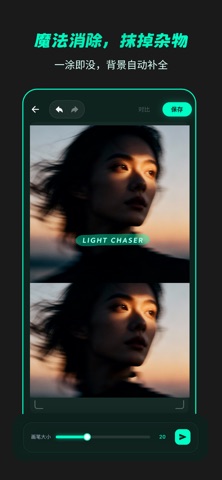
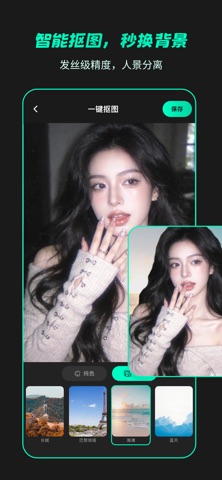
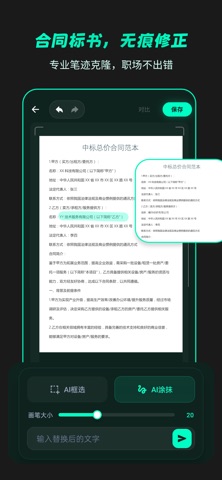
【产品简介】 图像细节不完美?无痕改字P图为您提供专业的 AI 修复方案。凭借深层的改字核心算法,我们致力于解决图片文字错误、背景杂乱等痛点。无论是处理纸张褶皱还是复杂底纹,都能实现自然的视觉融合。无痕改字P图,改完还像原图,让每一张图片都能重焕新生。 【核心功能】 AI 无痕改字: 深度识别原图笔迹风格与色泽,实现文字与底纹光影的自然融合。支持透视校正,确保修改后的文字位置精准。 魔法消除笔: 快速移除杂物、路人及遮挡物。AI 智能填补背景缺失,重塑干净画面。 智能抠图: 高精度边缘识别,人像与物体一秒分离,轻松更换背景。 【应用场景】 职场办公: 修正文演示稿或图片中的排版疏漏,确保视觉信息准确。 电商运营: 快速更新商品图价格标签,移除多余水印,提升素材质感。 生活创意: 移除风景照中的干扰项,创作极具个性的视觉海报。 图像清晰: 支持高清导出,确保修复后的图片细节依然锐利。 【选择理由】 视觉自然: 追求“修补无痕”的融合效果。 操作简便: 简约设计,点选涂抹即可完成修复。 纯净体验: 界面清爽,支持高…
App details
What you can learn from 无痕改字 -p图改字 批图p字抠字 文字消除笔
Every shipping app on the App Store has gone through the same decisions you're working through right now: which screenshot goes first, what caption sits over it, which device frame to show, what color the background should be. The 4 screenshots above are 无痕改字 -p图改字 批图p字抠字 文字消除笔's answers to those questions — they're public, they're real, and they made it through Apple's review.
What the numbers say: 无痕改字 -p图改字 批图p字抠字 文字消除笔 runs a dark set with one background colour (#1C1C1C) carried across every screenshot — the listing reads as a single poster when the shots sit side by side in search results. The accent colour we picked up, #5CCCAC, is the one to reuse for badges, arrows and highlighted words if you borrow this look. Hit Use this style to open the editor with these exact colours and drop your own screenshot in.
Notice the first screenshot in particular. It's the one users see in search results and on the product page, and it's where most apps spend their best caption and tightest design. Look at the proportion of background to phone, where the text sits, what one thing the image is trying to communicate.
Want to see how other Graphics & Design apps approach the same problem? Browse more Graphics & Design apps in the showcase.
Take what works into your own screenshots
Open LaunchShots and design your App Store & Google Play screenshots — pick a device frame, drop captions, ship in minutes. Free, in your browser.
Open the screenshot editor →Apps with a similar look
Closest background + accent colours among the listings we've analysed — useful when you want to see the same palette handled by a different team.