Screenshot style breakdown
Sampled from 6 of Speedtest - Speed Stars 2026's App Store screenshots — background, accent and theme, measured by LaunchShots (not something Apple publishes).
#040C1C bg
#272E3B
#2C5C6C accent
#FFFFFF text
Reading the caption text from the screenshots in your browser…
Screenshots



Icon palette
About this app
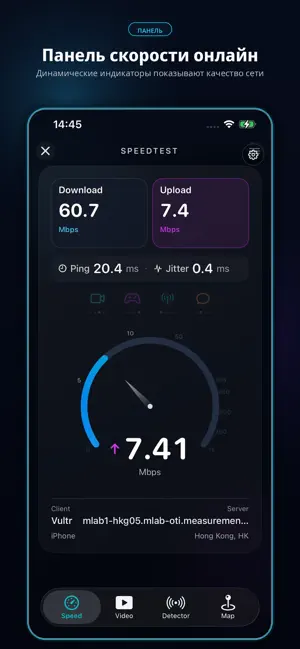
Название приложения Тест скорости сети SpeedTest Описание Используйте Тест скорости сети SpeedTest, чтобы быстро и удобно проверить скорость вашего интернет-соединения. Независимо от того, используете ли вы Wi-Fi, мобильную сеть или другое подключение, приложение поможет оценить текущее качество сети всего одним нажатием. Тест скорости сети SpeedTest позволяет измерить скорость загрузки, скорость выгрузки и задержку соединения, чтобы вы могли лучше понять, насколько стабильно работает ваша сеть и подходит ли она для просмотра видео, онлайн-игр, видеозвонков, загрузки файлов и обычного использования интернета. Основные возможности: — проверка скорости загрузки данных; — проверка скорости выгрузки данных; — измерение задержки соединения; — быстрый запуск теста одним нажатием; — понятное отображение качества текущего подключения; — помощь в диагностике проблем с Wi-Fi или мобильной с…
App details
What you can learn from Speedtest - Speed Stars 2026
Every shipping app on the App Store has gone through the same decisions you're working through right now: which screenshot goes first, what caption sits over it, which device frame to show, what color the background should be. The 6 screenshots above are Speedtest - Speed Stars 2026's answers to those questions — they're public, they're real, and they made it through Apple's review.
What the numbers say: Speedtest - Speed Stars 2026 runs a dark set with one background colour (#040C1C) carried across every screenshot — the listing reads as a single poster when the shots sit side by side in search results. The accent colour we picked up, #2C5C6C, is the one to reuse for badges, arrows and highlighted words if you borrow this look. Hit Use this style to open the editor with these exact colours and drop your own screenshot in.
Notice the first screenshot in particular. It's the one users see in search results and on the product page, and it's where most apps spend their best caption and tightest design. Look at the proportion of background to phone, where the text sits, what one thing the image is trying to communicate.
Want to see how other Utilities apps approach the same problem? Browse more Utilities apps in the showcase.
Take what works into your own screenshots
Open LaunchShots and design your App Store & Google Play screenshots — pick a device frame, drop captions, ship in minutes. Free, in your browser.
Open the screenshot editor →Apps with a similar look
Closest background + accent colours among the listings we've analysed — useful when you want to see the same palette handled by a different team.