Chart position — tracked daily by LaunchShots
Screenshot style breakdown
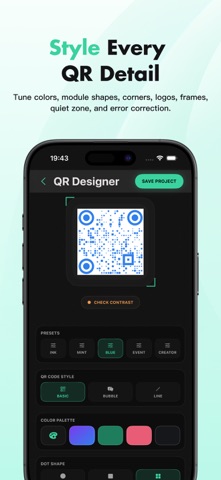
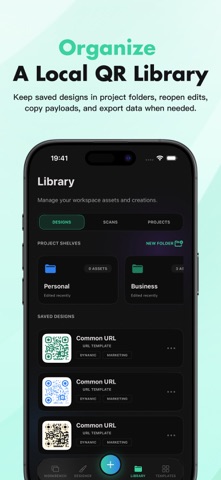
Sampled from 5 of QR Atelier's App Store screenshots — background, accent and theme, measured by LaunchShots (not something Apple publishes).
#F4FCFC bg
#D6DDDD
#3CD49C accent
#111111 text
Screenshots



Icon palette
About this app
美しく、かつ信頼性の高いQRコードを作成しましょう。QR Atelierは、単なるジェネレーターではなく、本格的なデザインワークショップを提供します。 テンプレートから始めるか、独自のテキストやリンクを貼り付けて作成できます。Wi-Fi、連絡先カード、メールアドレス、電話番号、SMS、位置情報、プロフィールリンクなど、様々な用途のQRコードを作成できます。色、モジュールの形状、コーナーのスタイル、中央のロゴ、フレーム、静止領域の間隔、エラー修正など、あらゆる細部をカスタマイズできます。 内蔵の読み取りチェック機能により、デザインの実用性を確保します。コントラストの低さ、静止領域が狭すぎる、ロゴが大きすぎる、レンダリングの問題などを警告してくれるので、スキャンできないコードを保存したり印刷したりすることはありません。 作成したデザインはすべてローカルライブラリに保存されます。プロジェクトフォルダを使って、デザインを開いたり、編集したり、複製したり、整理したりできます。デザインが完成したら、PNG形式(背景あり/な…
App details
What you can learn from QR Atelier
Every shipping app on the App Store has gone through the same decisions you're working through right now: which screenshot goes first, what caption sits over it, which device frame to show, what color the background should be. The 5 screenshots above are QR Atelier's answers to those questions — they're public, they're real, and they made it through Apple's review.
What the numbers say: QR Atelier runs a mixed light-and-dark set where the background shifts from screenshot to screenshot (first shot #F4FCFC) — each image has to stand on its own, so the captions carry more of the story. The accent colour we picked up, #3CD49C, is the one to reuse for badges, arrows and highlighted words if you borrow this look. Hit Use this style to open the editor with these exact colours and drop your own screenshot in.
Notice the first screenshot in particular. It's the one users see in search results and on the product page, and it's where most apps spend their best caption and tightest design. Look at the proportion of background to phone, where the text sits, what one thing the image is trying to communicate.
Want to see how other Utilities apps approach the same problem? Browse more Utilities apps in the showcase.
Take what works into your own screenshots
Open LaunchShots and design your App Store & Google Play screenshots — pick a device frame, drop captions, ship in minutes. Free, in your browser.
Open the screenshot editor →Apps with a similar look
Closest background + accent colours among the listings we've analysed — useful when you want to see the same palette handled by a different team.