Screenshot style breakdown
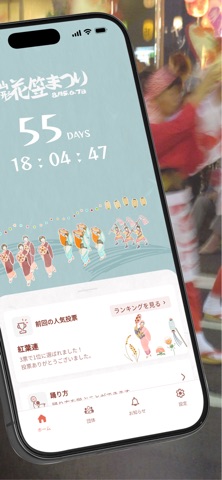
Sampled from 6 of 山形花笠まつり 公式アプリ's App Store screenshots — background, accent and theme, measured by LaunchShots (not something Apple publishes).
#ACCCCC bg
#97B3B3
#4C1414 accent
#111111 text
Screenshots



Icon palette
About this app
パレードの「今」を、手のひらで追いかけよう。 出場団体がいま会場のどこにいるか、地図でリアルタイムに確認できる。推し団体を見逃さず、応援にかけつけよう。山形県花笠協議会公認の公式アプリがあれば、初めての来場者も、毎年通うベテランも、花笠まつりをもっと深く楽しめる。 山形花笠まつりは、東北を代表する夏祭りのひとつ。毎年8月、山形市中心市街地を舞台に、花笠踊りの華やかな行列が繰り広げられる。「ヤッショ、マカショ」の掛け声と花笠音頭の旋律が沿道を満たすその光景は、東北の夏の風物詩として全国から多くの観光客が足を運ぶ。 初めて山形を旅行で訪れる方も、このアプリ一つで会場案内からナビまで対応できる。スケジュールや団体情報を事前に確認しておけば、当日の混雑した会場でも迷わずに動ける。無料でダウンロードして使えるので、旅の準備のひとつにぜひ加えてほしい。 ■主な機能 ・ライブマップ(団体現在地) パレードに出場する各団体の現在地を地図上にリアルタイム表示。自分の現在地も重ねて確認できるため、混雑した会場…
App details
What you can learn from 山形花笠まつり 公式アプリ
Every shipping app on the App Store has gone through the same decisions you're working through right now: which screenshot goes first, what caption sits over it, which device frame to show, what color the background should be. The 6 screenshots above are 山形花笠まつり 公式アプリ's answers to those questions — they're public, they're real, and they made it through Apple's review.
What the numbers say: 山形花笠まつり 公式アプリ runs a mixed light-and-dark set where the background shifts from screenshot to screenshot (first shot #ACCCCC) — each image has to stand on its own, so the captions carry more of the story. The accent colour we picked up, #4C1414, is the one to reuse for badges, arrows and highlighted words if you borrow this look. Hit Use this style to open the editor with these exact colours and drop your own screenshot in.
Notice the first screenshot in particular. It's the one users see in search results and on the product page, and it's where most apps spend their best caption and tightest design. Look at the proportion of background to phone, where the text sits, what one thing the image is trying to communicate.
Want to see how other Travel apps approach the same problem? Browse more Travel apps in the showcase.
Take what works into your own screenshots
Open LaunchShots and design your App Store & Google Play screenshots — pick a device frame, drop captions, ship in minutes. Free, in your browser.
Open the screenshot editor →Apps with a similar look
Closest background + accent colours among the listings we've analysed — useful when you want to see the same palette handled by a different team.