Screenshot changes — detected by LaunchShots
Screenshot style breakdown
Sampled from 6 of 撮るだけ!ダメージ計算's App Store screenshots — background, accent and theme, measured by LaunchShots (not something Apple publishes).
#FCCC04 bg
#DDB303
#4C5CAC accent
#111111 text
Screenshots


Icon palette
About this app
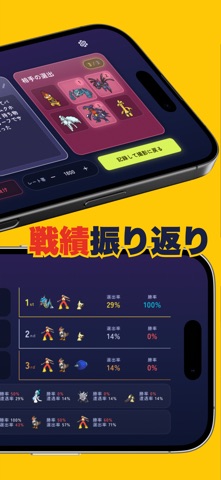
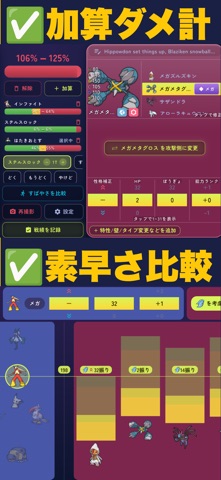
『45秒で使える』ポケモンチャンピオンズ専用のダメージ計算アプリ ダメ計が遅くて制限時間に間に合わないーそんな悩みを解決するため極限までラクにしました。 スマホ版/Switch版の両方に完全対応しています。 ■ 写真を撮って、選ぶだけ 選出画面を撮るだけで、敵味方のポケモン12匹が自動で読み込まれます。 あとはポケモン・技・ステータスを選ぶだけ!文字を入力して検索...と面倒な作業を繰り返す必要はもうありません。 パーティ画面を撮って、味方ポケモンの特性・持ち物・技・努力値を記録しておけば、もっともっと時短できます。 ■ そのまま記録して振り返り ダメ計が終わったら、そのまま相手パーティ・選出・メモを記録できます。 ポケモンやレート帯で戦績を絞り込んで、分析しましょう。 苦手な並びや、勝てる選出、活躍していないポケモンもひと目で把握できます! ■ 加算ダメージ計算に対応 ステルスロック+ガブリアスのじしん+ミミッキュのかげうちで、相手を倒せるか知りたいですよね? ダメ計中に「加算」ボタンをタップするだけで、これが45秒…
App details
What you can learn from 撮るだけ!ダメージ計算
Every shipping app on the App Store has gone through the same decisions you're working through right now: which screenshot goes first, what caption sits over it, which device frame to show, what color the background should be. The 6 screenshots above are 撮るだけ!ダメージ計算's answers to those questions — they're public, they're real, and they made it through Apple's review.
What the numbers say: 撮るだけ!ダメージ計算 runs a mixed light-and-dark set where the background shifts from screenshot to screenshot (first shot #FCCC04) — each image has to stand on its own, so the captions carry more of the story. The accent colour we picked up, #4C5CAC, is the one to reuse for badges, arrows and highlighted words if you borrow this look. Hit Use this style to open the editor with these exact colours and drop your own screenshot in.
Notice the first screenshot in particular. It's the one users see in search results and on the product page, and it's where most apps spend their best caption and tightest design. Look at the proportion of background to phone, where the text sits, what one thing the image is trying to communicate.
Want to see how other Utilities apps approach the same problem? Browse more Utilities apps in the showcase.
Take what works into your own screenshots
Open LaunchShots and design your App Store & Google Play screenshots — pick a device frame, drop captions, ship in minutes. Free, in your browser.
Open the screenshot editor →Apps with a similar look
Closest background + accent colours among the listings we've analysed — useful when you want to see the same palette handled by a different team.