Screenshot changes — detected by LaunchShots
Screenshot style breakdown
Sampled from 6 of msats's App Store screenshots — background, accent and theme, measured by LaunchShots (not something Apple publishes).
#FCFCFC bg
#DDDDDD
#C48434 accent
#111111 text
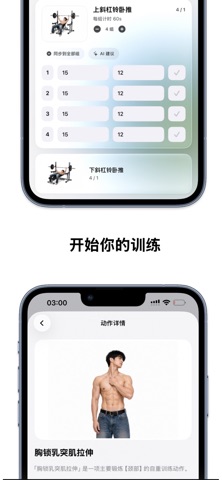
- #2人 ) 35 胸 锁 乳 突 肌 拉 伸
- #3隔 空 投 送 路 线 ®
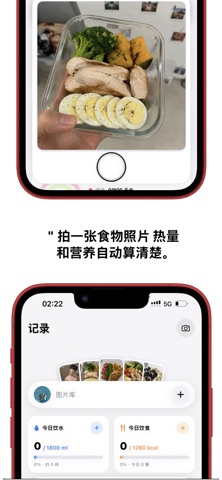
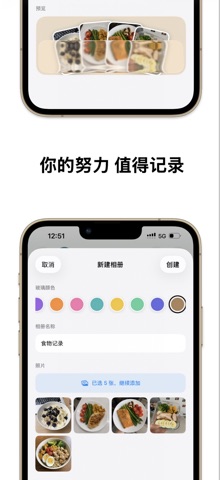
Captions read from the screenshots (OCR, may contain small errors): 2 headlines, 8.5 words on average (longest 10).
Screenshots



iPad screenshots


Icon palette
About this app
一个人练,也有人陪着你较劲。 Msats 把训练、跑步、吃饭这三件事装进一个 App,不是三个割裂的记录本,而是一条互相咬合的线:你今天练了什么,决定了它给你配多少碳水;你跑过哪里,在地图上真的留下了痕迹。 领地跑,把跑步变成一场攻城战 跑出一个闭环,圈内的土地就归你。地图按六边形网格划分,你跑过的地方会被点亮成你的颜色;路过别人的地盘,还能把它抢过来。 20 种领地风格随你挑,占下的每一片都能命名 城市排行榜,看看你在这座城市排第几 每一次圈地都与健康 App 交叉对账,坐车、代跑一律不算数 跑腻了配速和公里数?这次你跑的是地盘。 拍一张,看清这顿饭 对着饭拍一张,它会告诉你这是什么、有多少克、多少热量。 一盘几样菜,每样单独浮起来,各自标出分量和热量 盖饭、拌面这类拌在一起的,直接列出成分和各自占比 袋装零食、瓶装饮料直接读包装上的净含量和营养成分表,比目测准得多 一万三千条营养库校准,拿不准的时候它会先问你,而不是硬猜一个数字 长按快门还能说话,番茄炒蛋加一碗米饭,说完松手,照片和这句话一起交给它。 训…
App details
What you can learn from msats
Every shipping app on the App Store has gone through the same decisions you're working through right now: which screenshot goes first, what caption sits over it, which device frame to show, what color the background should be. The 9 screenshots above are msats's answers to those questions — they're public, they're real, and they made it through Apple's review.
What the numbers say: msats runs a light set with one background colour (#FCFCFC) carried across every screenshot — the listing reads as a single poster when the shots sit side by side in search results. The accent colour we picked up, #C48434, is the one to reuse for badges, arrows and highlighted words if you borrow this look. Hit Use this style to open the editor with these exact colours and drop your own screenshot in.
Notice the first screenshot in particular. It's the one users see in search results and on the product page, and it's where most apps spend their best caption and tightest design. Look at the proportion of background to phone, where the text sits, what one thing the image is trying to communicate.
Want to see how other Health & Fitness apps approach the same problem? Browse more Health & Fitness apps in the showcase.
Take what works into your own screenshots
Open LaunchShots and design your App Store & Google Play screenshots — pick a device frame, drop captions, ship in minutes. Free, in your browser.
Open the screenshot editor →Apps with a similar look
Closest background + accent colours among the listings we've analysed — useful when you want to see the same palette handled by a different team.