Chart position — tracked daily by LaunchShots
Screenshot style breakdown
Sampled from 6 of ReadTime: 読書でスマホ依存対策・SNSアプリロック's App Store screenshots — background, accent and theme, measured by LaunchShots (not something Apple publishes).
#141414 bg
#343434
#CC6434 accent
#FFFFFF text
Reading the caption text from the screenshots in your browser…
Screenshots

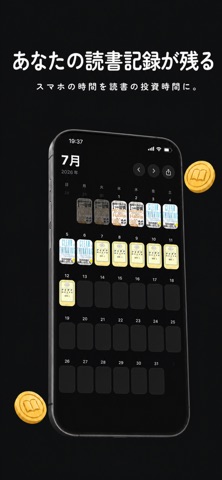
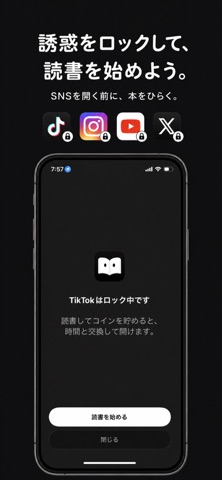


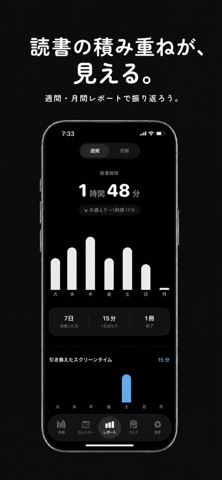
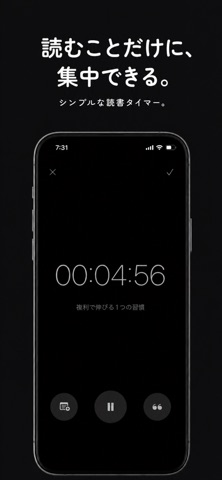
Icon palette
About this app
スマホのスクロール時間を読書時間に変えよう。 ReadTimeは、読書した時間を、選んだアプリの利用時間と交換できる読書習慣アプリです。 ついSNSや動画を見続けてしまう時間を、読みたかった本を開くきっかけに。読書タイマーを完了するとコインが貯まり、そのコインを使ってロック中のアプリを一定時間だけ利用できます。 【読書時間をアプリ利用時間に】 ・読書タイマーで読書時間を記録 ・完了した読書時間に応じてコインを獲得 ・コインをアプリの利用時間と交換 ・交換した時間を開始すると、選んだアプリのロックを一時解除 ・時間が終了すると自動で再ロック 【美しい本棚と読書管理】 ・本を検索、ISBNバーコード、手入力で登録 ・読みたい、読書中、読了のステータス管理 ・ページ数と読書進捗を記録 ・本ごとのメモや心に残ったフレーズを保存 【読書習慣が目に見える】 ・本の表紙が並ぶ読書カレンダー ・連続読書日数を確認できるストリーク ・週間・月間の読書時間レポート ・読書状況をすぐ確認できるウィジェット ・読書カレンダーを画像で保存・…
App details
What you can learn from ReadTime: 読書でスマホ依存対策・SNSアプリロック
Every shipping app on the App Store has gone through the same decisions you're working through right now: which screenshot goes first, what caption sits over it, which device frame to show, what color the background should be. The 7 screenshots above are ReadTime: 読書でスマホ依存対策・SNSアプリロック's answers to those questions — they're public, they're real, and they made it through Apple's review.
What the numbers say: ReadTime: 読書でスマホ依存対策・SNSアプリロック runs a dark set with one background colour (#141414) carried across every screenshot — the listing reads as a single poster when the shots sit side by side in search results. The accent colour we picked up, #CC6434, is the one to reuse for badges, arrows and highlighted words if you borrow this look. Hit Use this style to open the editor with these exact colours and drop your own screenshot in.
Notice the first screenshot in particular. It's the one users see in search results and on the product page, and it's where most apps spend their best caption and tightest design. Look at the proportion of background to phone, where the text sits, what one thing the image is trying to communicate.
Want to see how other Book apps approach the same problem? Browse more Book apps in the showcase.
Take what works into your own screenshots
Open LaunchShots and design your App Store & Google Play screenshots — pick a device frame, drop captions, ship in minutes. Free, in your browser.
Open the screenshot editor →Apps with a similar look
Closest background + accent colours among the listings we've analysed — useful when you want to see the same palette handled by a different team.