Screenshot style breakdown
Sampled from 4 of マーラッシュ's App Store screenshots — background, accent and theme, measured by LaunchShots (not something Apple publishes).
#FC0404 bg
#FC2727
#F47C74 accent
#FFFFFF text
Reading the caption text from the screenshots in your browser…
Screenshots
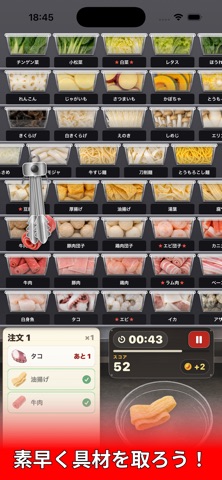
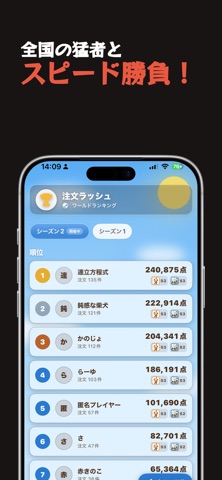
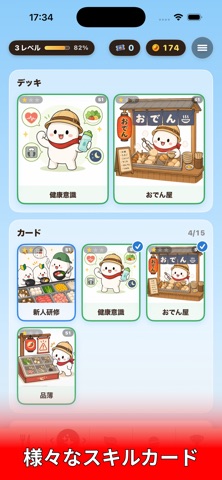
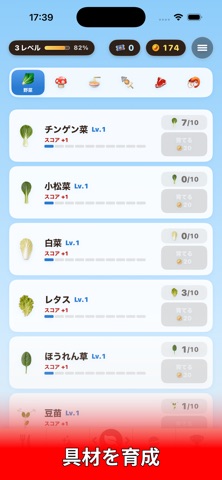
iPad screenshots


Icon palette
About this app
「マーラッシュ」は、大人気の麻辣湯(マーラータン)屋さんを体験できるシミュレーションゲームです。 棚にずらりと並んだ具材をトングでつかんで、ボウルにいれよう! チンゲン菜、ラム肉、うずらの卵、春雨…… 今日のあなたは何をトッピングする? ■■ 60秒の熱狂「注文ラッシュ」 ■■ 次々に届く注文どおりに、具材をすばやく集めるスコアアタックモード。 ・注文と同じ具材をタップしてボウルへ! ・連続で注文をさばくとボーナス倍率アップ ・お手つきはタイム減少のペナルティ ・ゲーム終了でスコアは自動でランキングへ 慣れてきたら、伝説の麻辣湯職人を目指そう。 ■■ 世界ランキング ■■ スコアは世界中のプレイヤーとリアルタイムで競争。 ・記録は1人1枠、ベストスコアだけが残る ・上位を目指してなんども挑戦できる ・ニックネームだけで参加OK、アカウント登録不要 ・スコアの公開・非公開はいつでも切り替え可能 ■■ こんな人におすすめ ■■ ・麻辣湯が好きでたまらない ・スキマ時間にサクッと遊べるゲームを探している ・料理系・お店屋さん系…
App details
What you can learn from マーラッシュ
Every shipping app on the App Store has gone through the same decisions you're working through right now: which screenshot goes first, what caption sits over it, which device frame to show, what color the background should be. The 6 screenshots above are マーラッシュ's answers to those questions — they're public, they're real, and they made it through Apple's review.
What the numbers say: マーラッシュ runs a dark set where the background shifts from screenshot to screenshot (first shot #FC0404) — each image has to stand on its own, so the captions carry more of the story. The accent colour we picked up, #F47C74, is the one to reuse for badges, arrows and highlighted words if you borrow this look. Hit Use this style to open the editor with these exact colours and drop your own screenshot in.
Notice the first screenshot in particular. It's the one users see in search results and on the product page, and it's where most apps spend their best caption and tightest design. Look at the proportion of background to phone, where the text sits, what one thing the image is trying to communicate.
Want to see how other Games apps approach the same problem? Browse more Games apps in the showcase.
Take what works into your own screenshots
Open LaunchShots and design your App Store & Google Play screenshots — pick a device frame, drop captions, ship in minutes. Free, in your browser.
Open the screenshot editor →Apps with a similar look
Closest background + accent colours among the listings we've analysed — useful when you want to see the same palette handled by a different team.