Screenshot style breakdown
Sampled from 6 of HaloLink's App Store screenshots — background, accent and theme, measured by LaunchShots (not something Apple publishes).
#040404 bg
#272727
#34346C accent
#FFFFFF text
Reading the caption text from the screenshots in your browser…
Screenshots



Icon palette
About this app
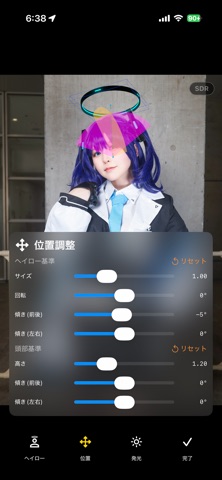
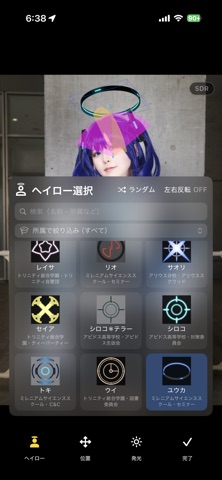
2次元の世界にしかなかったヘイローを、あなたの頭の上に! カメラを人物に向けるだけで、頭上にヘイロー(光の輪)が浮かびます。 ただの平面的なスタンプではなく、1つずつ丁寧に作られた3Dモデルを、頭の位置・大きさ・向きを立体的に捉えたうえでリアルタイムにカメラ映像へ合成します。頭を傾けても、横を向いても、遠ざかっても、2次元の世界のバーチャルな物体がカメラに映った3次元の世界にしっかりと追従してくれる、新感覚のカメラアプリです。 ■ 主な機能 ・リアルタイム合成 カメラ映像にその場でヘイローを合成。撮る前に仕上がりを確認できます。 ・写真撮影(HDR対応) 端末のカメラ性能をそのまま活かした高解像度撮影。HDRで撮った写真は明るさの階調を保ったまま保存されます。 ・動画撮影 撮影後に全フレームを解析し、動きに滑らかに追従するヘイローを合成します。 ・最大5人まで同時に 複数の人が写っていても、それぞれの頭上にヘイローを付けられます。もちろん別々のヘイローを選択することもできます。 ・細かな調整 大きさ・高さ・…
App details
What you can learn from HaloLink
Every shipping app on the App Store has gone through the same decisions you're working through right now: which screenshot goes first, what caption sits over it, which device frame to show, what color the background should be. The 7 screenshots above are HaloLink's answers to those questions — they're public, they're real, and they made it through Apple's review.
What the numbers say: HaloLink runs a dark set with one background colour (#040404) carried across every screenshot — the listing reads as a single poster when the shots sit side by side in search results. The accent colour we picked up, #34346C, is the one to reuse for badges, arrows and highlighted words if you borrow this look. Hit Use this style to open the editor with these exact colours and drop your own screenshot in.
Notice the first screenshot in particular. It's the one users see in search results and on the product page, and it's where most apps spend their best caption and tightest design. Look at the proportion of background to phone, where the text sits, what one thing the image is trying to communicate.
Want to see how other Photo & Video apps approach the same problem? Browse more Photo & Video apps in the showcase.
Take what works into your own screenshots
Open LaunchShots and design your App Store & Google Play screenshots — pick a device frame, drop captions, ship in minutes. Free, in your browser.
Open the screenshot editor →Apps with a similar look
Closest background + accent colours among the listings we've analysed — useful when you want to see the same palette handled by a different team.