Chart position — tracked daily by LaunchShots
Screenshot style breakdown
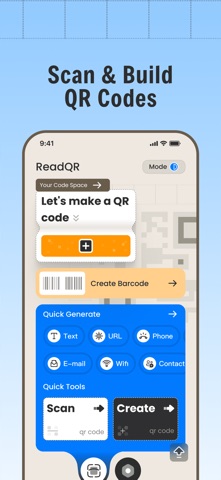
Sampled from 6 of ReadQR & Barcode Creator's App Store screenshots — background, accent and theme, measured by LaunchShots (not something Apple publishes).
#94CCFC bg
#82B3DD
#047CFC accent
#111111 text
Screenshots


Icon palette
About this app
ReadQRは、より実用的で差別化されたデザインを採用し、QRコードのスキャンと作成体験を新しくします。このオールインワンのコードツールは、QRコードの一括スキャン、通常のQRコードスキャン、バーコード作成、QRコード生成、スキャン履歴管理に対応し、さらに独自のURLセキュリティ検出機能を搭載しています。 QRコードのスキャンでは、ReadQRがリアルタイムのカメラスキャン、端末内の写真ライブラリからの読み込み、一括スキャンなど、柔軟で便利な認識方法を提供します。端末のカメラで実物のQRコードをすぐに読み取ったり、保存済みの画像やスクリーンショットを読み込んで認識したり、複数のQRコードを一度に識別したりできるため、スキャン効率を大きく高められます。 URLセキュリティ検出で、オンライン利用をより安全に 出所不明のQRコードの多くはWebページにリンクしており、潜在的なセキュリティリスクを含む場合があります。ReadQRは、スキャンされたすべてのリンクを対象とした独自のセキュリティ検出機能を備えています。 スキャンしたQRコード内…
App details
What you can learn from ReadQR & Barcode Creator
Every shipping app on the App Store has gone through the same decisions you're working through right now: which screenshot goes first, what caption sits over it, which device frame to show, what color the background should be. The 6 screenshots above are ReadQR & Barcode Creator's answers to those questions — they're public, they're real, and they made it through Apple's review.
What the numbers say: ReadQR & Barcode Creator runs a light set where the background shifts from screenshot to screenshot (first shot #94CCFC) — each image has to stand on its own, so the captions carry more of the story. The accent colour we picked up, #047CFC, is the one to reuse for badges, arrows and highlighted words if you borrow this look. Hit Use this style to open the editor with these exact colours and drop your own screenshot in.
Notice the first screenshot in particular. It's the one users see in search results and on the product page, and it's where most apps spend their best caption and tightest design. Look at the proportion of background to phone, where the text sits, what one thing the image is trying to communicate.
Want to see how other Utilities apps approach the same problem? Browse more Utilities apps in the showcase.
Take what works into your own screenshots
Open LaunchShots and design your App Store & Google Play screenshots — pick a device frame, drop captions, ship in minutes. Free, in your browser.
Open the screenshot editor →Apps with a similar look
Closest background + accent colours among the listings we've analysed — useful when you want to see the same palette handled by a different team.