Chart position — tracked daily by LaunchShots
Screenshot style breakdown
Sampled from 6 of JayPlay's App Store screenshots — background, accent and theme, measured by LaunchShots (not something Apple publishes).
#04041C bg
#27273B
#543C24 accent
#FFFFFF text
Screenshots






Icon palette
About this app
JayPlay bringt dich und deine Freunde zusammen: zehn Spiele, die ihr gemeinsam spielt – auf der Couch oder jeder bei sich zuhause. SO FUNKTIONIERT'S Erstelle mit einem Tipp einen Raum, teile den Code oder QR-Code, und schon seid ihr drin – 2 bis 12 Leute pro Runde. Du kannst Freunde auch direkt über ihren Nutzernamen einladen. Jeder spielt auf seinem eigenen Handy. DIE SPIELE • Hot Hand – Noch eine Karte ziehen oder Punkte sichern? Das Zock-Duell: Wer zuerst 200 hat, gewinnt. • Brush Rush – Einer malt, alle raten mit. Wer das Wort zuerst hat, holt die meisten Punkte. • Buzzer Knockout – Eine Zeit, kein Timer: Wer sie nur mit Gefühl am besten trifft, gewinnt. • Mind Match – Wie gut kennt ihr euch wirklich? Schätzt, wo auf der Skala die Antwort liegt. • Is It Cheating – Die große Streitfrage: Ist das schon Fremdgehen? Stimmt ab und diskutiert. • Brain Battle – Das Quiz-Duell in Echtzeit…
App details
What you can learn from JayPlay
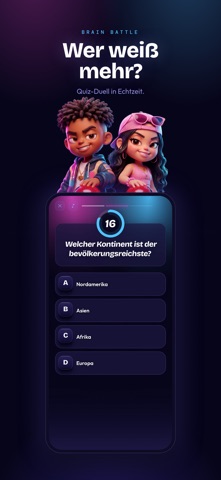
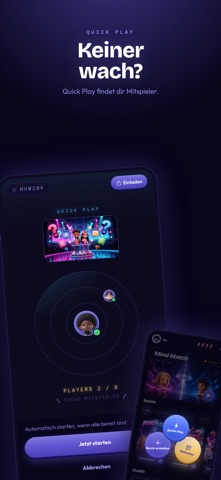
Every shipping app on the App Store has gone through the same decisions you're working through right now: which screenshot goes first, what caption sits over it, which device frame to show, what color the background should be. The 10 screenshots above are JayPlay's answers to those questions — they're public, they're real, and they made it through Apple's review.
What the numbers say: JayPlay runs a dark set with one background colour (#04041C) carried across every screenshot — the listing reads as a single poster when the shots sit side by side in search results. The accent colour we picked up, #543C24, is the one to reuse for badges, arrows and highlighted words if you borrow this look. Hit Use this style to open the editor with these exact colours and drop your own screenshot in.
Notice the first screenshot in particular. It's the one users see in search results and on the product page, and it's where most apps spend their best caption and tightest design. Look at the proportion of background to phone, where the text sits, what one thing the image is trying to communicate.
Want to see how other Games apps approach the same problem? Browse more Games apps in the showcase.
Take what works into your own screenshots
Open LaunchShots and design your App Store & Google Play screenshots — pick a device frame, drop captions, ship in minutes. Free, in your browser.
Open the screenshot editor →Apps with a similar look
Closest background + accent colours among the listings we've analysed — useful when you want to see the same palette handled by a different team.