Chart position — tracked daily by LaunchShots
Screenshot style breakdown
Sampled from 4 of PinDose AI's App Store screenshots — background, accent and theme, measured by LaunchShots (not something Apple publishes).
#FCFCF4 bg
#DDDDD6
#FC74A4 accent
#111111 text
Screenshots


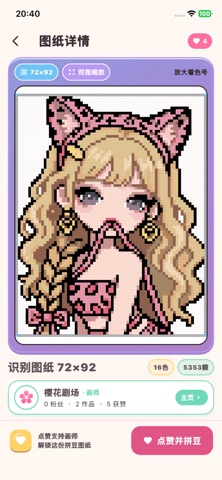

iPad screenshots

Icon palette
About this app
PinDose AI 是一款专注拼豆(像素豆)创作的工具,把「找图纸 — 数色号 — 备豆 — 拼装」这条链路一次做完。 【图纸识别】 拍照或从相册选一张拼豆图纸,可在手机本地完成网格检测与色号识别,本地识别无需网络。可选的「汤圆超级识别」需联网,并在你同意后上传所选图纸处理。识别结果可以逐格核对和修改,直接变成能照着拼的图纸。 【像素画布,自由创作】 内置像素画布,支持自定义尺寸、取色、填充、橡皮和撤销,随手把喜欢的图案画成拼豆图纸。 【色卡与豆仓】 内置 MARD 291 色标准色卡,自动统计每种色号需要多少颗。豆仓记录你手上已有的存货,还差哪几色一目了然,出门补货不用再靠猜。 【灵感社区】 浏览画师投稿的图纸,按人物、萌宠、美食、风景、游戏、IP 分类查找;关注喜欢的画师,收藏想拼的作品。在拼豆圈晒出自己的成品照片,也看看别人拼了什么。 【蓝牙拼豆板】 连接 PinDose 拼豆板(蓝牙 BLE 硬件),图纸会逐格点亮指引,跟着灯一颗一颗放就行,不用反复数格子。没有这块硬件不影响其它功能。 【账号与隐私】 浏览和本地图纸识别无需登录…
App details
What you can learn from PinDose AI
Every shipping app on the App Store has gone through the same decisions you're working through right now: which screenshot goes first, what caption sits over it, which device frame to show, what color the background should be. The 5 screenshots above are PinDose AI's answers to those questions — they're public, they're real, and they made it through Apple's review.
What the numbers say: PinDose AI runs a light set with one background colour (#FCFCF4) carried across every screenshot — the listing reads as a single poster when the shots sit side by side in search results. The accent colour we picked up, #FC74A4, is the one to reuse for badges, arrows and highlighted words if you borrow this look. Hit Use this style to open the editor with these exact colours and drop your own screenshot in.
Notice the first screenshot in particular. It's the one users see in search results and on the product page, and it's where most apps spend their best caption and tightest design. Look at the proportion of background to phone, where the text sits, what one thing the image is trying to communicate.
Want to see how other Graphics & Design apps approach the same problem? Browse more Graphics & Design apps in the showcase.
Take what works into your own screenshots
Open LaunchShots and design your App Store & Google Play screenshots — pick a device frame, drop captions, ship in minutes. Free, in your browser.
Open the screenshot editor →Apps with a similar look
Closest background + accent colours among the listings we've analysed — useful when you want to see the same palette handled by a different team.