Chart position — tracked daily by LaunchShots
Screenshot style breakdown
Sampled from 6 of usage - 随时看清 AI 用量's App Store screenshots — background, accent and theme, measured by LaunchShots (not something Apple publishes).
#0C0C0C bg
#2E2E2E
#FCAC94 accent
#FFFFFF text
Screenshots




iPad screenshots


Icon palette
About this app
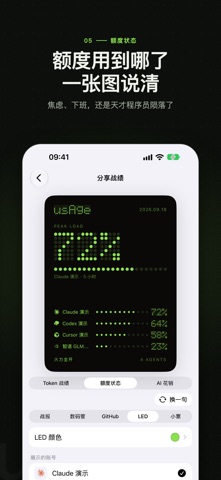
usAge 把散落在各家后台的 AI 额度收进一个 App:用了多少、什么时候重置、还剩多少钱。 连上你常用的 AI 服务,状态页、桌面小组件、Apple Watch 上都能随时看到。 所有额度一屏看清 已用比例、重置倒计时、余额一起显示,顺序按你自己排。点开卡片还能看到 5 小时窗口、每周额度、Token 消耗与账号信息。 五种桌面小组件 基础、数码管、贡献图、LED、卡包五种样式,小号、中号、大号、超大号都有,最多同时看 4 个账号,iPhone 还支持锁屏小组件。在小组件上就能切换额度、刷新,Codex 账号还能直接用重置卡。 可以晒的分享卡片 Token 战绩、额度状态、AI 花销三种场景,五种卡片样式,文案可以「换一句」,保存到相册或直接分享。 iPhone、iPad、Mac、Apple Watch 通用 打开 iCloud 同步后,一台设备上连接的账号会出现在其他设备上;凭证字段在你的 iCloud 私有数据库里端到端加密。 凭证只保存在本机 usAge 不需要注册就能用。Cookie、API Key、OAuth 令牌保存在系统钥匙串,用量请求由你的设备直接发往服务商,不经过我们的服务器。 已接入的服务 Claude…
App details
What you can learn from usage - 随时看清 AI 用量
Every shipping app on the App Store has gone through the same decisions you're working through right now: which screenshot goes first, what caption sits over it, which device frame to show, what color the background should be. The 13 screenshots above are usage - 随时看清 AI 用量's answers to those questions — they're public, they're real, and they made it through Apple's review.
What the numbers say: usage - 随时看清 AI 用量 runs a dark set with one background colour (#0C0C0C) carried across every screenshot — the listing reads as a single poster when the shots sit side by side in search results. The accent colour we picked up, #FCAC94, is the one to reuse for badges, arrows and highlighted words if you borrow this look. Hit Use this style to open the editor with these exact colours and drop your own screenshot in.
Notice the first screenshot in particular. It's the one users see in search results and on the product page, and it's where most apps spend their best caption and tightest design. Look at the proportion of background to phone, where the text sits, what one thing the image is trying to communicate.
Want to see how other Developer Tools apps approach the same problem? Browse more Developer Tools apps in the showcase.
Take what works into your own screenshots
Open LaunchShots and design your App Store & Google Play screenshots — pick a device frame, drop captions, ship in minutes. Free, in your browser.
Open the screenshot editor →Apps with a similar look
Closest background + accent colours among the listings we've analysed — useful when you want to see the same palette handled by a different team.