Chart position — tracked daily by LaunchShots
Screenshot style breakdown
Sampled from 6 of zcode connect's App Store screenshots — background, accent and theme, measured by LaunchShots (not something Apple publishes).
#FCFCF4 bg
#DDDDD6
#A47CF4 accent
#111111 text
Screenshots




iPad screenshots


Icon palette
About this app
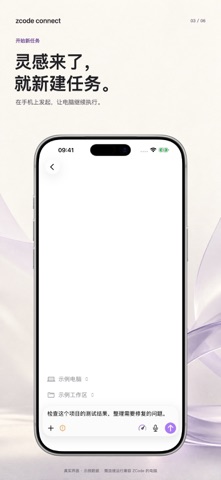
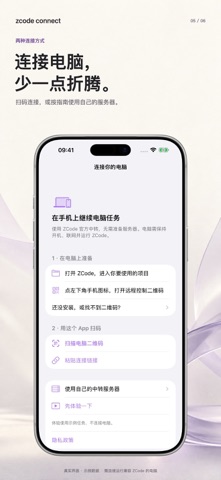
把电脑里的开发任务,带到 iPhone 和 iPad。 zcode connect 是独立开发的 ZCode 桌面端配套客户端,并非 ZCode 官方应用。需要你自己的电脑运行兼容的 ZCode 桌面端。 随时了解进展 查看工作区和任务列表,阅读对话、工具活动与文件变更。 继续手头的工作 发送后续消息,创建任务,并在电脑端支持时处理操作确认、调整任务配置。所用模型与服务由电脑端配置,相关账户和费用由对应服务提供方管理。 两种连接方式 使用 ZCode 自带连接服务:按应用内指南,在电脑上打开手机连接入口,再用手机扫描或粘贴连接链接。无需自己部署中转服务器。 使用自己的服务器:应用内提供完整开发资料包,交给自己的 AI agent 按环境适配。 先体验,再连接 首次打开可进入离线演示,了解界面和操作。演示数据不会连接你的电脑。 使用前请了解 • 需要 iOS 26 / iPadOS 26 或更新版本。 • 电脑须保持开机、联网,并运行兼容的桌面端;本应用不会在手机上独立运行桌面任务。 • 可用功能随桌面端版本与配置变化。 • 完成提醒依赖应用及时接收任务事件,长时间退到后台或关闭应用后不…
App details
What you can learn from zcode connect
Every shipping app on the App Store has gone through the same decisions you're working through right now: which screenshot goes first, what caption sits over it, which device frame to show, what color the background should be. The 12 screenshots above are zcode connect's answers to those questions — they're public, they're real, and they made it through Apple's review.
What the numbers say: zcode connect runs a light set with one background colour (#FCFCF4) carried across every screenshot — the listing reads as a single poster when the shots sit side by side in search results. The accent colour we picked up, #A47CF4, is the one to reuse for badges, arrows and highlighted words if you borrow this look. Hit Use this style to open the editor with these exact colours and drop your own screenshot in.
Notice the first screenshot in particular. It's the one users see in search results and on the product page, and it's where most apps spend their best caption and tightest design. Look at the proportion of background to phone, where the text sits, what one thing the image is trying to communicate.
Want to see how other Developer Tools apps approach the same problem? Browse more Developer Tools apps in the showcase.
Take what works into your own screenshots
Open LaunchShots and design your App Store & Google Play screenshots — pick a device frame, drop captions, ship in minutes. Free, in your browser.
Open the screenshot editor →Apps with a similar look
Closest background + accent colours among the listings we've analysed — useful when you want to see the same palette handled by a different team.