Chart position — tracked daily by LaunchShots
Screenshot style breakdown
Sampled from 6 of 要覧online's App Store screenshots — background, accent and theme, measured by LaunchShots (not something Apple publishes).
#ECFCFC bg
#CFDDDD
#1444BC accent
#111111 text
Reading the caption text from the screenshots in your browser…
Screenshots




iPad screenshots


Icon palette
About this app
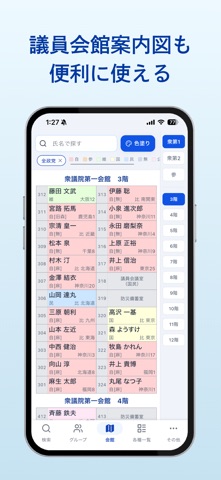
要覧onlineは、『国会議員要覧』『国会要覧』を発行する国政情報センターが提供する、政治・行政関係者のための業務支援ツールです。 Web版(youranonline.jp)と同じアカウントで、スマートフォン・タブレットから使えます。 ■ 主な機能 ・議員検索:国会議員を氏名・選挙区・役職などで簡単に検索。各議員の豊富な情報を閲覧可能。 ・各種一覧:閣僚等名簿、委員会名簿、党役員名簿、党派一覧、当選回数表、勤続年数表、生まれ年表、歴代内閣一覧、歴代委員長等。 ・会館案内図:議員会館の各フロアの部屋割り。政党・会派・委員会・議員グループで該当議員の部屋だけを色塗り可能。 ・議員グループ:議連や会合の単位で議員を自由にグループ化。肩書・並び順の設定、議員以外の人物の追加も可能。 ・メモ:議員ごとに自分だけのメモを記録。項目は自由に設定可能。 ・チームでの共有:議員グループとメモを部署や事務所のメンバーと共有。 ・オフライン閲覧:基本的な議員情報は、通信が不安定な場所でも表示可能。 ■ ご利用について ・会員登録(無料)だけで、…
App details
What you can learn from 要覧online
Every shipping app on the App Store has gone through the same decisions you're working through right now: which screenshot goes first, what caption sits over it, which device frame to show, what color the background should be. The 12 screenshots above are 要覧online's answers to those questions — they're public, they're real, and they made it through Apple's review.
What the numbers say: 要覧online runs a light set with one background colour (#ECFCFC) carried across every screenshot — the listing reads as a single poster when the shots sit side by side in search results. The accent colour we picked up, #1444BC, is the one to reuse for badges, arrows and highlighted words if you borrow this look. Hit Use this style to open the editor with these exact colours and drop your own screenshot in.
Notice the first screenshot in particular. It's the one users see in search results and on the product page, and it's where most apps spend their best caption and tightest design. Look at the proportion of background to phone, where the text sits, what one thing the image is trying to communicate.
Want to see how other Reference apps approach the same problem? Browse more Reference apps in the showcase.
Take what works into your own screenshots
Open LaunchShots and design your App Store & Google Play screenshots — pick a device frame, drop captions, ship in minutes. Free, in your browser.
Open the screenshot editor →Apps with a similar look
Closest background + accent colours among the listings we've analysed — useful when you want to see the same palette handled by a different team.