Chart position — tracked daily by LaunchShots
Screenshot style breakdown
Sampled from 6 of SkyCast's App Store screenshots — background, accent and theme, measured by LaunchShots (not something Apple publishes).
#242C3C bg
#424957
#5C5C94 accent
#FFFFFF text
Reading the caption text from the screenshots in your browser…
Screenshots



Icon palette
About this app
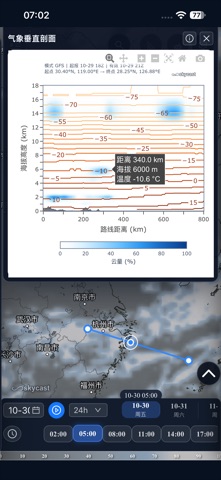
SkyCast,预见天空的无限可能。 SkyCast 是一款以原创算法与自主研发核心系统为特色的天空观测与气象可视化应用。围绕火烧云、悬日、观星与天文观测,将精细化预报、卫星云图和专业观测工具融为一体,为摄影爱好者、天文爱好者与气象爱好者提供更科学的的天空判断。 【火烧云预报】 以大气光学与辐射传输机理为基础,综合分析云层、气溶胶、空气分子相互作用及地形影响,精细评估朝霞与晚霞的观赏条件。通过评分、等级与关键参数,直观了解不同地点、日期和早晚时段的预报差异,为出发时间与拍摄地点提供有据可依的参考。持续的预报实践与算法迭代,构成 SkyCast 在火烧云预报领域的核心技术优势。 【临近预报】 火烧云临近预报依托自主研发的 Aether 多源数据同化与临近预报系统,融合卫星、地面观测等信息,分析云场与气溶胶分布的时空变化。在准确率上明显超过短期数值模型的结果,智能设置观测闹钟提醒。 【24 小时可见光云图与气象地图】 基于自主遥感处理技术,提供 24 小时连续可见光云图展示,直观观察昼夜云系变化。专业气象地图支持主流数值模式,融合…
App details
What you can learn from SkyCast
Every shipping app on the App Store has gone through the same decisions you're working through right now: which screenshot goes first, what caption sits over it, which device frame to show, what color the background should be. The 9 screenshots above are SkyCast's answers to those questions — they're public, they're real, and they made it through Apple's review.
What the numbers say: SkyCast runs a dark set with one background colour (#242C3C) carried across every screenshot — the listing reads as a single poster when the shots sit side by side in search results. The accent colour we picked up, #5C5C94, is the one to reuse for badges, arrows and highlighted words if you borrow this look. Hit Use this style to open the editor with these exact colours and drop your own screenshot in.
Notice the first screenshot in particular. It's the one users see in search results and on the product page, and it's where most apps spend their best caption and tightest design. Look at the proportion of background to phone, where the text sits, what one thing the image is trying to communicate.
Want to see how other Weather apps approach the same problem? Browse more Weather apps in the showcase.
Take what works into your own screenshots
Open LaunchShots and design your App Store & Google Play screenshots — pick a device frame, drop captions, ship in minutes. Free, in your browser.
Open the screenshot editor →Apps with a similar look
Closest background + accent colours among the listings we've analysed — useful when you want to see the same palette handled by a different team.