Chart position — tracked daily by LaunchShots
Screenshot style breakdown
Sampled from 6 of 红果短剧红果漫剧绿泡泡短剧场河马火龙剧场番茄小说AI短剧制作's App Store screenshots — background, accent and theme, measured by LaunchShots (not something Apple publishes).
#0C0C0C bg
#2E2E2E
#FC6C5C accent
#FFFFFF text
Screenshots
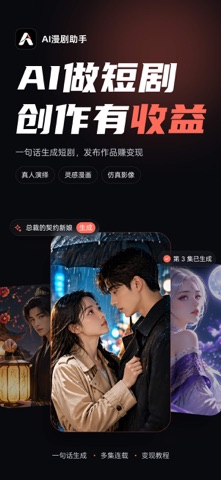


iPad screenshots


Icon palette
About this app
让灵感开场,让故事成真。 AI漫剧助手是一款面向漫剧与短剧创作者的人工智能创作工具。从一个灵感或一段故事出发,你可以借助 AI 完成剧本、角色、画面、声音和视频的创作,把脑海中的故事做成自己的作品。 【三种风格,自由选择】 · 仿真影像:真人质感,动漫演绎 · 真人演绎:现实光影,逼真呈现 · 灵动漫画:让漫画角色动起来 【从灵感到成片】 · 剧本创作:把灵感整理成完整的故事 · 图片创作:生成角色形象和剧情画面 · 声音创作:为作品添加声音表现 · 视频创作:让静态画面动起来,生成剧集内容 · 字幕识别:识别音视频内容,生成字幕 【新手与进阶,两种模式】 第一次创作可以从新手模式开始,轻松上手;想要更细致地把控作品,可以使用进阶模式。 【角色与作品,统一管理】 管理角色和形象参考,让同一角色在不同剧集中尽量保持一致。作品按类型和模式分类,创作进度一目了然。 【创作攻略,边学边做】 内容涵盖软件上手、故事结构、人物设定、开头设计和剧情节奏,帮助你一步步完成第一部作品。 【订阅说明】 · 自动续订会员在确认购买后,通过你的 …
App details
What you can learn from 红果短剧红果漫剧绿泡泡短剧场河马火龙剧场番茄小说AI短剧制作
Every shipping app on the App Store has gone through the same decisions you're working through right now: which screenshot goes first, what caption sits over it, which device frame to show, what color the background should be. The 11 screenshots above are 红果短剧红果漫剧绿泡泡短剧场河马火龙剧场番茄小说AI短剧制作's answers to those questions — they're public, they're real, and they made it through Apple's review.
What the numbers say: 红果短剧红果漫剧绿泡泡短剧场河马火龙剧场番茄小说AI短剧制作 runs a dark set with one background colour (#0C0C0C) carried across every screenshot — the listing reads as a single poster when the shots sit side by side in search results. The accent colour we picked up, #FC6C5C, is the one to reuse for badges, arrows and highlighted words if you borrow this look. Hit Use this style to open the editor with these exact colours and drop your own screenshot in.
Notice the first screenshot in particular. It's the one users see in search results and on the product page, and it's where most apps spend their best caption and tightest design. Look at the proportion of background to phone, where the text sits, what one thing the image is trying to communicate.
Want to see how other Graphics & Design apps approach the same problem? Browse more Graphics & Design apps in the showcase.
Take what works into your own screenshots
Open LaunchShots and design your App Store & Google Play screenshots — pick a device frame, drop captions, ship in minutes. Free, in your browser.
Open the screenshot editor →Apps with a similar look
Closest background + accent colours among the listings we've analysed — useful when you want to see the same palette handled by a different team.