Chart position — tracked daily by LaunchShots
Screenshot style breakdown
Sampled from 2 of 西暦・和暦・年齢・干支早見表's App Store screenshots — background, accent and theme, measured by LaunchShots (not something Apple publishes).
#FCFCFC bg
#DDDDDD
#B47C34 accent
#111111 text
Reading the caption text from the screenshots in your browser…
Screenshots
iPad screenshots
Icon palette
About this app
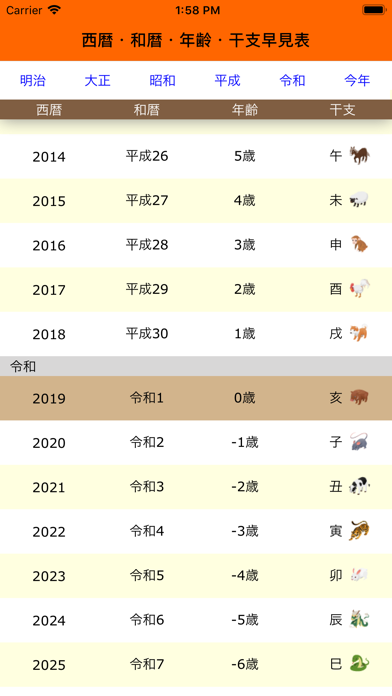
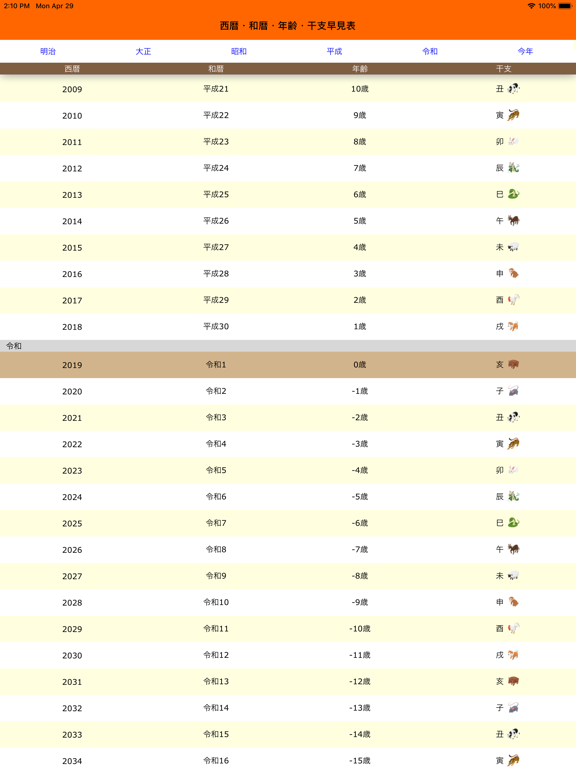
西暦・和暦・年齢・干支を簡単に調べることができるアプリです。 今年の和暦・西暦・干支をアイコンに表示していますので、アイコンをホーム上に置いておけば、アプリを起動しなくても確認できて大変便利です。 西暦2000年は平成何年だっけ?今年の干支は何だっけ?という時にこのアプリを使えば簡単に調べることが出来ます。 高校卒業は何年だっけ?大学卒業は何年だっけ? 平成元年は西暦何年だっけ? おばあちゃんは何歳だっけ? そんな時にこのアプリを使ってもらえると簡単に調べることができます。 西暦・和暦・年齢・干支が一覧になっているので見やすく、使い方もとても簡単です。 ※アップデートされた方で起動しないという報告を頂いております。一度アプリを削除して頂き、再度新しくインストールして頂きますと改善されることがございますので、お手数ですが「アプリ削除 - 再インストール」をお試し頂けたらと思います。 ※3.5.0バージョンよりセキュリティ面を考慮しiOS12以上の対応となります。可能でしたら最新のiOSにアップデートの上ご利…
App details
What you can learn from 西暦・和暦・年齢・干支早見表
Every shipping app on the App Store has gone through the same decisions you're working through right now: which screenshot goes first, what caption sits over it, which device frame to show, what color the background should be. The 4 screenshots above are 西暦・和暦・年齢・干支早見表's answers to those questions — they're public, they're real, and they made it through Apple's review.
What the numbers say: 西暦・和暦・年齢・干支早見表 runs a light set with one background colour (#FCFCFC) carried across every screenshot — the listing reads as a single poster when the shots sit side by side in search results. The accent colour we picked up, #B47C34, is the one to reuse for badges, arrows and highlighted words if you borrow this look. Hit Use this style to open the editor with these exact colours and drop your own screenshot in.
Notice the first screenshot in particular. It's the one users see in search results and on the product page, and it's where most apps spend their best caption and tightest design. Look at the proportion of background to phone, where the text sits, what one thing the image is trying to communicate.
Want to see how other Reference apps approach the same problem? Browse more Reference apps in the showcase.
Take what works into your own screenshots
Open LaunchShots and design your App Store & Google Play screenshots — pick a device frame, drop captions, ship in minutes. Free, in your browser.
Open the screenshot editor →Apps with a similar look
Closest background + accent colours among the listings we've analysed — useful when you want to see the same palette handled by a different team.