Chart position — tracked daily by LaunchShots
Screenshot changes — detected by LaunchShots
Screenshot style breakdown
Sampled from 5 of 美的美居's App Store screenshots — background, accent and theme, measured by LaunchShots (not something Apple publishes).
#FCFCFC bg
#DDDDDD
#9CDCFC accent
#111111 text
Screenshots



iPad screenshots



Icon palette
About this app
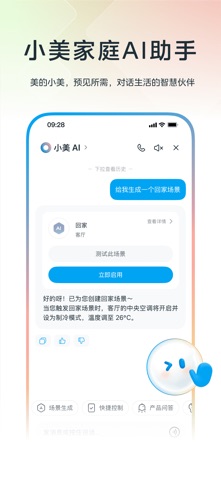
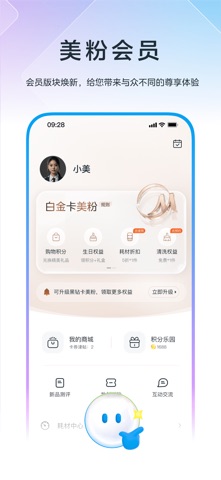
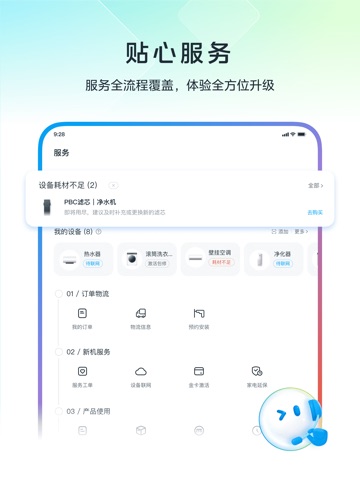
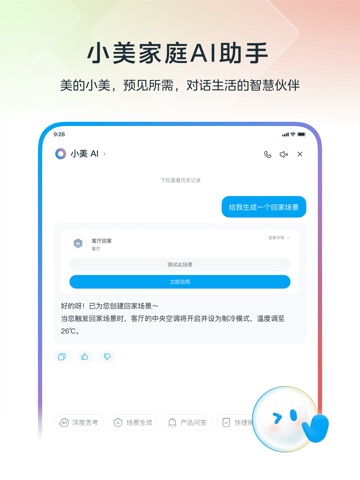
美的美居APP | 开启AI智能家居新时代 无缝连接美的全品牌及生态设备,搭载小美AI实现主动式智能交互,新增一站式服务板块,打造便捷舒适的智慧生活。 【核心功能】 1、极简互联 蓝牙/Wi-Fi双模智能适配,三步完成组网 全品类设备统一接入协议三步完成智能组网配置 2、一站式服务 订单物流/安装联网/产品使用/产品换修,服务全流程支持 工程师远程视频诊断,90%问题1次解决 7×24小时智能客服在线支持 3、全场景智控 APP/语音/中控屏/车载屏四端互联 语音指令+小组件控制,响应更快、更准 4、AI家庭助手 实时监测耗材余量/设备状态,智能预警提醒 海量家电知识库秒级响应,专业问题解答 设备支持食谱智能推荐,烘烤时间不纠结 深度AI逻辑+拟人化交互,陪伴式家居管理 5、多品类商城 聚合全屋智能生态链,精选美的旗下品牌及生态产品,覆盖智能家电/耗材配件/清洗服务/家居周边全品类 正品保障+新人有礼+耗材折扣+极速配送+无忧安装,为你提供一站式购物体验 持续升级AIoT生态体验,让科技赋能美好生活。
App details
What you can learn from 美的美居
Every shipping app on the App Store has gone through the same decisions you're working through right now: which screenshot goes first, what caption sits over it, which device frame to show, what color the background should be. The 10 screenshots above are 美的美居's answers to those questions — they're public, they're real, and they made it through Apple's review.
What the numbers say: 美的美居 runs a light set with one background colour (#FCFCFC) carried across every screenshot — the listing reads as a single poster when the shots sit side by side in search results. The accent colour we picked up, #9CDCFC, is the one to reuse for badges, arrows and highlighted words if you borrow this look. Hit Use this style to open the editor with these exact colours and drop your own screenshot in.
Notice the first screenshot in particular. It's the one users see in search results and on the product page, and it's where most apps spend their best caption and tightest design. Look at the proportion of background to phone, where the text sits, what one thing the image is trying to communicate.
Want to see how other Lifestyle apps approach the same problem? Browse more Lifestyle apps in the showcase.
Take what works into your own screenshots
Open LaunchShots and design your App Store & Google Play screenshots — pick a device frame, drop captions, ship in minutes. Free, in your browser.
Open the screenshot editor →Apps with a similar look
Closest background + accent colours among the listings we've analysed — useful when you want to see the same palette handled by a different team.