Screenshot style breakdown
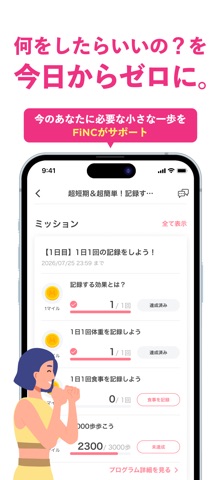
Sampled from 6 of FiNC ダイエット・健康管理のカロリー計算や体重記録アプリ's App Store screenshots — background, accent and theme, measured by LaunchShots (not something Apple publishes).
#EC3484 bg
#EE5095
#FC84BC accent
#FFFFFF text
Screenshots


Icon palette
About this app
ダイエットに必要な体重管理やカロリー計算はもちろん、食事管理や運動記録(万歩計・歩数計)、生理管理や睡眠記録もこのアプリひとつでOK!痩せたい・減量したい方から妊活・腸活・生活習慣の記録・見直しまで、FiNCは手軽に続けられるヘルスケア・健康管理アプリです。 FiNCではダイエットを、バランスの取れた食事や適切な運動・休養を通じ、健康的な生活を目指すことと位置付けています。健康診断の結果が気になる方のメタボ・内臓脂肪・体脂肪の管理にも役立ちます。 また、FiNCオリジナル体組成計と連携することにより、Bluetooth接続で、体組成計に乗るだけで自動的に体重、BMI、体脂肪率、基礎代謝、身体年齢など、11個のデータも取得できます。 「歩くだけでガチャが回せる歩数ガチャ(ポイ活)」では、4000歩、8000歩でガチャチケットがもらえて、ポイント(FiNCマイル)が当たります。 貯めたポイントは、コンビニ商品券、電子マネー、豪華商品に交換できます。楽しみながら健康管理できるので、病気や怪我をする前から、日常的に楽しく記録できるサ…
App details
What you can learn from FiNC ダイエット・健康管理のカロリー計算や体重記録アプリ
Every shipping app on the App Store has gone through the same decisions you're working through right now: which screenshot goes first, what caption sits over it, which device frame to show, what color the background should be. The 6 screenshots above are FiNC ダイエット・健康管理のカロリー計算や体重記録アプリ's answers to those questions — they're public, they're real, and they made it through Apple's review.
What the numbers say: FiNC ダイエット・健康管理のカロリー計算や体重記録アプリ runs a mixed light-and-dark set where the background shifts from screenshot to screenshot (first shot #EC3484) — each image has to stand on its own, so the captions carry more of the story. The accent colour we picked up, #FC84BC, is the one to reuse for badges, arrows and highlighted words if you borrow this look. Hit Use this style to open the editor with these exact colours and drop your own screenshot in.
Notice the first screenshot in particular. It's the one users see in search results and on the product page, and it's where most apps spend their best caption and tightest design. Look at the proportion of background to phone, where the text sits, what one thing the image is trying to communicate.
Want to see how other Health & Fitness apps approach the same problem? Browse more Health & Fitness apps in the showcase.
Take what works into your own screenshots
Open LaunchShots and design your App Store & Google Play screenshots — pick a device frame, drop captions, ship in minutes. Free, in your browser.
Open the screenshot editor →Apps with a similar look
Closest background + accent colours among the listings we've analysed — useful when you want to see the same palette handled by a different team.