Chart position — tracked daily by LaunchShots
Screenshot changes — detected by LaunchShots
Screenshot style breakdown
Sampled from 4 of アルファポリス 小説・漫画を読もう!'s App Store screenshots — background, accent and theme, measured by LaunchShots (not something Apple publishes).
#FCA424 bg
#DD901F
#2C8C04 accent
#111111 text
Screenshots


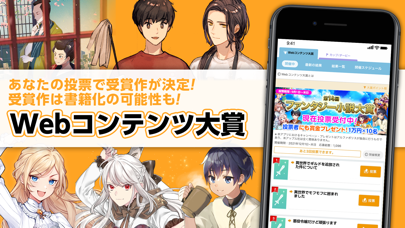

iPad screenshots


Icon palette
About this app
小説や漫画の投稿・閲覧を無料で楽しめるWebサイト「アルファポリス」の公式iOSアプリケーションです。 【アルファポリスの特徴】 ■「毎日¥0」でアルファポリスのオリジナル小説・漫画が読める! 対象となっている小説・公式漫画をチャージすることで作品ごとに1話ずつ無料で読むことができます。 ■小説を読もう! みんなの投稿した様々なジャンルの小説がサクサク読める! あなたのお気に入りの作品を見つけよう! 書籍化作品も「毎日¥0」やチケットで楽しめる! ■まんがを読もう! アルファポリスの人気公式漫画が連載中! 「毎日¥0」やチケットを使って全話読みつくせ! みんなの投稿漫画はいつでも読み放題! ■専用ビューアで読みやすい! いつでもどこでも小説・マンガがサクサク読める! ■Webコンテンツ大賞に投票しよう! 毎月開催されるWebコンテンツ大賞に参加しよう! あなたの投票で入賞作が決まります!! ■ログインしてさらに便利に! 素敵な作品をみつけたら「お気に入り」や「感想」機能を使って作家・作品を応援しよう! ※本アプリにおける…
App details
What you can learn from アルファポリス 小説・漫画を読もう!
Every shipping app on the App Store has gone through the same decisions you're working through right now: which screenshot goes first, what caption sits over it, which device frame to show, what color the background should be. The 8 screenshots above are アルファポリス 小説・漫画を読もう!'s answers to those questions — they're public, they're real, and they made it through Apple's review.
What the numbers say: アルファポリス 小説・漫画を読もう! runs a light set where the background shifts from screenshot to screenshot (first shot #FCA424) — each image has to stand on its own, so the captions carry more of the story. The accent colour we picked up, #2C8C04, is the one to reuse for badges, arrows and highlighted words if you borrow this look. Hit Use this style to open the editor with these exact colours and drop your own screenshot in.
Notice the first screenshot in particular. It's the one users see in search results and on the product page, and it's where most apps spend their best caption and tightest design. Look at the proportion of background to phone, where the text sits, what one thing the image is trying to communicate.
Want to see how other Book apps approach the same problem? Browse more Book apps in the showcase.
Take what works into your own screenshots
Open LaunchShots and design your App Store & Google Play screenshots — pick a device frame, drop captions, ship in minutes. Free, in your browser.
Open the screenshot editor →Apps with a similar look
Closest background + accent colours among the listings we've analysed — useful when you want to see the same palette handled by a different team.