Screenshot style breakdown
Sampled from 4 of 遺伝子博士ダイエット's App Store screenshots — background, accent and theme, measured by LaunchShots (not something Apple publishes).
#FCFCFC bg
#DDDDDD
#8CD4FC accent
#111111 text
Screenshots


Icon palette
About this app
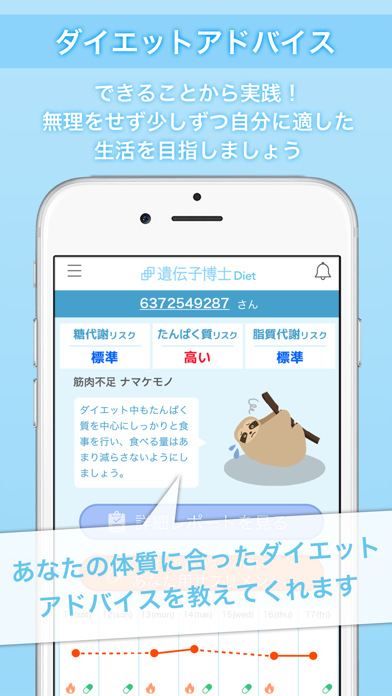
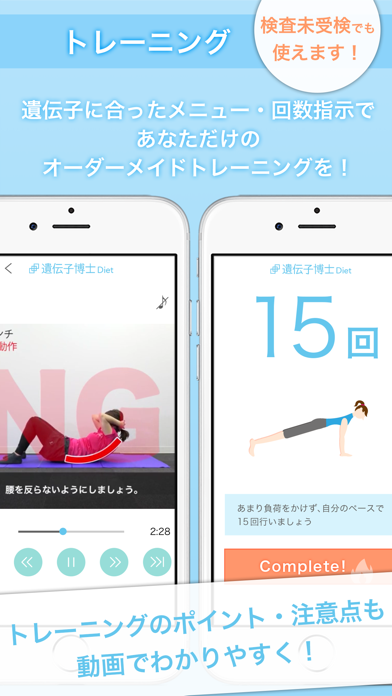
あなたの遺伝的体質に合った方法でダイエットができる ダイエットサポートアプリです。 ■あなたに合ったダイエットアドバイスを教えてくれる! 遺伝子博士の遺伝子検査を受けるとレポートでわかったあなたの 食生活・ライフスタイル改善のアドバイスを教えてくれます。 できることから実践!効果的なダイエットをサポート! ■体重管理を楽しく 遺伝子検査結果ででた遺伝子タイプ別の動物と一緒に体重管理。 あなたの体重変動に合わせて動物の姿も変化します。 毎日の体重管理で楽しく理想の姿を手に入れましょう。 ※検査未受検の場合は動物ではなく博士になります。 ■トレーニングをわかりやすく 気になる部分と遺伝的体質によるおすすめのトレーニングを合わせ 更に、タイプによる回数指示であなただけのオーダーメイドメニューを! トレーナーによる動画でトレーニングの説明が見れるため トレーニングのポイント・注意点を抑えより効果的なトレーニングを 実施することができます。 ■遺伝子検査の結果確認もアプリで! 遺伝子検査の結果レポートはも…
App details
What you can learn from 遺伝子博士ダイエット
Every shipping app on the App Store has gone through the same decisions you're working through right now: which screenshot goes first, what caption sits over it, which device frame to show, what color the background should be. The 4 screenshots above are 遺伝子博士ダイエット's answers to those questions — they're public, they're real, and they made it through Apple's review.
What the numbers say: 遺伝子博士ダイエット runs a light set where the background shifts from screenshot to screenshot (first shot #FCFCFC) — each image has to stand on its own, so the captions carry more of the story. The accent colour we picked up, #8CD4FC, is the one to reuse for badges, arrows and highlighted words if you borrow this look. Hit Use this style to open the editor with these exact colours and drop your own screenshot in.
Notice the first screenshot in particular. It's the one users see in search results and on the product page, and it's where most apps spend their best caption and tightest design. Look at the proportion of background to phone, where the text sits, what one thing the image is trying to communicate.
Want to see how other Health & Fitness apps approach the same problem? Browse more Health & Fitness apps in the showcase.
Take what works into your own screenshots
Open LaunchShots and design your App Store & Google Play screenshots — pick a device frame, drop captions, ship in minutes. Free, in your browser.
Open the screenshot editor →Apps with a similar look
Closest background + accent colours among the listings we've analysed — useful when you want to see the same palette handled by a different team.