Chart position — tracked daily by LaunchShots
Screenshot changes — detected by LaunchShots
Screenshot style breakdown
Sampled from 5 of 格力+'s App Store screenshots — background, accent and theme, measured by LaunchShots (not something Apple publishes).
#ECF4FC bg
#CFD6DD
#3494B4 accent
#111111 text
Screenshots
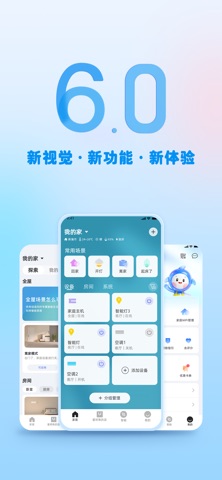


iPad screenshots


Icon palette
About this app
格力+ App是一款格力电器专为用户倾心打造的智能家居平台应用,帮助你轻松连接格力旗下所有智能家电设备。并且基于丰富的智能家居设备种类,贴近用户真实生活场景,通过智能推荐差异化场景玩法,带来互联互通的全新智能体验。 一•家居 •一 •「设备联网」可通过扫描发现附近设备或扫机身二维码进行配网,实现远程控制。 •「设备控制」无论何时何地,轻松交互、随心控制智能家居设备。 •「房间管理」分配设备所属房间,方便查找与管理。 •「系统看板」集中展示实时状态与数据,一目了然地掌握全屋动态,便捷管理家居环境。 一•智能•一 •「探索」精确推荐预设场景,一键快速启用,即可直接使用。 •「我的」管理自定义场景,并提供睡眠音乐、健康菜谱等内容。 一•董明珠的店•一 •「便捷购买」董明珠的店,打造方便、快捷的购物体验。 一•我的•一 •「账号管理」对账号信息进行管理,如头像、昵称、手机号、微信绑定等。 •「消息管理」系统消息、设备消息的相关信息管理。 •「家居管理」家庭信息与成员管理,以及家庭WiFi管理。 •「服务中心」提供帮助、问题反馈和售后等多…
App details
What you can learn from 格力+
Every shipping app on the App Store has gone through the same decisions you're working through right now: which screenshot goes first, what caption sits over it, which device frame to show, what color the background should be. The 8 screenshots above are 格力+'s answers to those questions — they're public, they're real, and they made it through Apple's review.
What the numbers say: 格力+ runs a light set with one background colour (#ECF4FC) carried across every screenshot — the listing reads as a single poster when the shots sit side by side in search results. The accent colour we picked up, #3494B4, is the one to reuse for badges, arrows and highlighted words if you borrow this look. Hit Use this style to open the editor with these exact colours and drop your own screenshot in.
Notice the first screenshot in particular. It's the one users see in search results and on the product page, and it's where most apps spend their best caption and tightest design. Look at the proportion of background to phone, where the text sits, what one thing the image is trying to communicate.
Want to see how other Utilities apps approach the same problem? Browse more Utilities apps in the showcase.
Take what works into your own screenshots
Open LaunchShots and design your App Store & Google Play screenshots — pick a device frame, drop captions, ship in minutes. Free, in your browser.
Open the screenshot editor →Apps with a similar look
Closest background + accent colours among the listings we've analysed — useful when you want to see the same palette handled by a different team.