Chart position — tracked daily by LaunchShots
Screenshot style breakdown
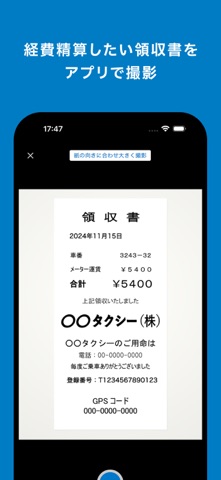
Sampled from 4 of 楽楽精算's App Store screenshots — background, accent and theme, measured by LaunchShots (not something Apple publishes).
#047CC4 bg
#278ECC
#043C64 accent
#FFFFFF text
Screenshots



Icon palette
About this app
「経費精算の為に帰社しないといけない。。」 『楽楽精算』はそんな無駄を削減し、社内の生産性向上に貢献します。 外出や出張には経費精算がつきものですが、社外から経費精算を行う術がなく経費を精算する為だけに帰社するという非効率がしばしば発生しています。 『楽楽精算』では社外から簡単に経費の精算ができる機能を多数保有しており、外出先での空き時間などを活用し経費精算を完了する事が出来るようになります。 ◆主な機能 ・領収書を撮影するだけで領収書の内容(金額、取引日、取引先)を自動でデータ化(OCR機能) ・電子帳簿保存法にも対応。領収書をアップロードするタイミングでタイムスタンプを付与。 ・交通費や出張費の交通費の精算機能。 ・経費や交際費の精算もアプリから簡単経費精算が可能。 ・各種申請の承認が外出先からボタン1つで承認完了。 ・社内の規定チェックをシステムが行う事で楽楽承認にも対応。 ※当アプリはクラウド型経費精算システム「楽楽精算」をご利用のお客様向けアプリです。 ※OCR機能は楽楽精算オプ…
App details
What you can learn from 楽楽精算
Every shipping app on the App Store has gone through the same decisions you're working through right now: which screenshot goes first, what caption sits over it, which device frame to show, what color the background should be. The 4 screenshots above are 楽楽精算's answers to those questions — they're public, they're real, and they made it through Apple's review.
What the numbers say: 楽楽精算 runs a dark set with one background colour (#047CC4) carried across every screenshot — the listing reads as a single poster when the shots sit side by side in search results. The accent colour we picked up, #043C64, is the one to reuse for badges, arrows and highlighted words if you borrow this look. Hit Use this style to open the editor with these exact colours and drop your own screenshot in.
Notice the first screenshot in particular. It's the one users see in search results and on the product page, and it's where most apps spend their best caption and tightest design. Look at the proportion of background to phone, where the text sits, what one thing the image is trying to communicate.
Want to see how other Business apps approach the same problem? Browse more Business apps in the showcase.
Take what works into your own screenshots
Open LaunchShots and design your App Store & Google Play screenshots — pick a device frame, drop captions, ship in minutes. Free, in your browser.
Open the screenshot editor →Apps with a similar look
Closest background + accent colours among the listings we've analysed — useful when you want to see the same palette handled by a different team.