Chart position — tracked daily by LaunchShots
Screenshot changes — detected by LaunchShots
Screenshot style breakdown
Sampled from 6 of مران: حساب السعرات والتمارين's App Store screenshots — background, accent and theme, measured by LaunchShots (not something Apple publishes).
#3CF4F4 bg
#34D6D6
#0C9CD4 accent
#111111 text
Screenshots



Icon palette
About this app
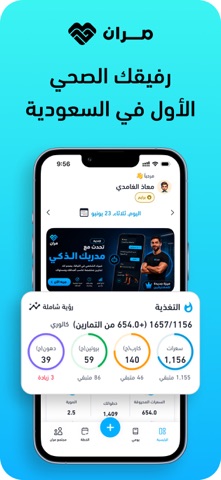
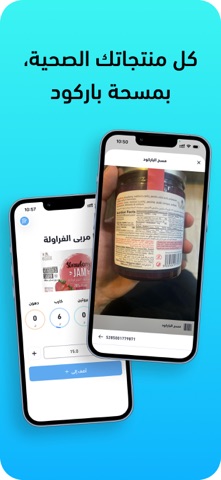
احصل على أفضل أداء رياضي وصحة متكاملة مع تطبيق مِران، رفيقك الصحي الأول في السعودية: مدرب ذكي (AI) - مسح الأكل بالصورة - تمارين منزلية - حساب سعرات - خطط دايت مخصصة - تصحيح فوري للوضعيات - وصفات صحية. تطبيق "مِران" هو تجربة لياقة ثورية تجمع بين قوة الذكاء الاصطناعي، وخطط التمارين الشخصية، والتتبع الغذائي الدقيق، ليقدم لك كل ما تحتاجه لتحقيق أهدافك الصحية والرياضية بكفاءة لا مثيل لها. تمرّن بذكاء أكبر، وليس بجهد أعلى فقط. مميزات تطبيق مِران: مدربك الشخصي الذكي (AI Trainer): تصحيح فوري للوضعيات: يساعدك مدربك الذكي على تحسين وضعيتك أثناء التمرين عبر الكاميرا، لضمان أقصى استفادة وأداء أفضل. تتبع آلي للتمارين: يقوم المدرب الذكي بعدّ كل تكرار وكل جولة تقوم بها تلقائيًا، ويسجل تقدمك بدقة فائقة. تحديات ذكاء اصطناعي: اختبر حدود لياقتك مع تحديات فريدة تتكيف مع مستواك وتدفعك للتطور. تمارين رياضية متنوعة وذكية: تمارين منزلية: سهلة وفعالة بدون أجهزة لتحقيق وقت لياقة مثالي في أي مكان. برامج متنوع…
App details
What you can learn from مران: حساب السعرات والتمارين
Every shipping app on the App Store has gone through the same decisions you're working through right now: which screenshot goes first, what caption sits over it, which device frame to show, what color the background should be. The 10 screenshots above are مران: حساب السعرات والتمارين's answers to those questions — they're public, they're real, and they made it through Apple's review.
What the numbers say: مران: حساب السعرات والتمارين runs a light set with one background colour (#3CF4F4) carried across every screenshot — the listing reads as a single poster when the shots sit side by side in search results. The accent colour we picked up, #0C9CD4, is the one to reuse for badges, arrows and highlighted words if you borrow this look. Hit Use this style to open the editor with these exact colours and drop your own screenshot in.
Notice the first screenshot in particular. It's the one users see in search results and on the product page, and it's where most apps spend their best caption and tightest design. Look at the proportion of background to phone, where the text sits, what one thing the image is trying to communicate.
Want to see how other Health & Fitness apps approach the same problem? Browse more Health & Fitness apps in the showcase.
Take what works into your own screenshots
Open LaunchShots and design your App Store & Google Play screenshots — pick a device frame, drop captions, ship in minutes. Free, in your browser.
Open the screenshot editor →Apps with a similar look
Closest background + accent colours among the listings we've analysed — useful when you want to see the same palette handled by a different team.