Chart position — tracked daily by LaunchShots
Screenshot changes — detected by LaunchShots
Screenshot style breakdown
Sampled from 6 of 雅迪智行's App Store screenshots — background, accent and theme, measured by LaunchShots (not something Apple publishes).
#FCFCFC bg
#DDDDDD
#6CB494 accent
#111111 text
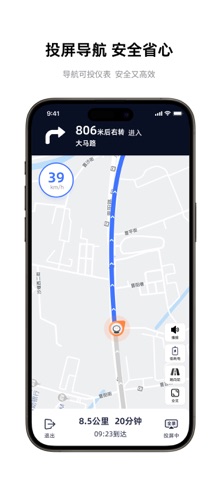
- #1车 辆 导航 发 Q 搜索 目的 地
- #2$/ pt 退出 09:23 到 达 BRED
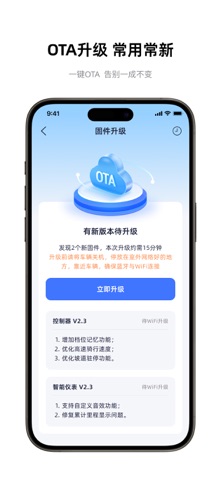
- #31. 增加 档 位 记忆 功能 ; 2. 优化 高 速 骑 行 速度 ; 3. 优化 坡 道 驻 停 功 能 。
- #4# 超 超 超 超 长 生 WoWMom 摩 登 骑 行 季 雅 迪 摩登 打卡 定格 精彩 瞬间 发 现 E i
- #5当前 颜色 @
- #678 6 150 15 86 查看 所 有 行程
Captions read from the screenshots (OCR, may contain small errors): 6 headlines, 12.5 words on average (longest 24).
Screenshots



Icon palette
About this app
高端智能出行服务平台,搭载智能中控等多项智能科技,简化操控方式,满足出行需求,获悉骑行轨迹,掌控爱车状态,提升用车安全,全方位打造高端智能出行新方式! 【智能控车】 提供多种控车方案,语音控车动口不动手,唤醒词与语音指令之间无需间隔,激活语音直接执行指令,解放双手,提供效率及生活便利。 蓝牙近距离靠近解锁,更有一键打开座桶,即使忘带钥匙也可控车。 手机远程控制车辆开关锁,忘记锁车也可一键解决。远程闪灯鸣笛,迅速锁定车辆位置,地铁站找车不在困难。 【智慧导航】 同时支持使用百度地图、腾讯地图及高德地图进行导航;可通过APP选择兴趣点一键发送到车,通过智能仪表导航至目的地; 【实时信息推送】 车辆实时状态信息、生日及节假日祝福、天气变化、新车上市、保养、优惠等实用生活信息,实时推送给用户。 【远程查看车辆状态】 远程查看车辆里程、电量、车辆是否上锁,方便车主随时观察爱车状态。 【一键寻车】 用户可以通过手机APP一键寻车,并查看与车辆距离,自动规划寻车路线。 【电子围栏】 提供更周全的车辆安全管理方案,…
App details
What you can learn from 雅迪智行
Every shipping app on the App Store has gone through the same decisions you're working through right now: which screenshot goes first, what caption sits over it, which device frame to show, what color the background should be. The 7 screenshots above are 雅迪智行's answers to those questions — they're public, they're real, and they made it through Apple's review.
What the numbers say: 雅迪智行 runs a light set with one background colour (#FCFCFC) carried across every screenshot — the listing reads as a single poster when the shots sit side by side in search results. The accent colour we picked up, #6CB494, is the one to reuse for badges, arrows and highlighted words if you borrow this look. Hit Use this style to open the editor with these exact colours and drop your own screenshot in.
Notice the first screenshot in particular. It's the one users see in search results and on the product page, and it's where most apps spend their best caption and tightest design. Look at the proportion of background to phone, where the text sits, what one thing the image is trying to communicate.
Want to see how other Utilities apps approach the same problem? Browse more Utilities apps in the showcase.
Take what works into your own screenshots
Open LaunchShots and design your App Store & Google Play screenshots — pick a device frame, drop captions, ship in minutes. Free, in your browser.
Open the screenshot editor →Apps with a similar look
Closest background + accent colours among the listings we've analysed — useful when you want to see the same palette handled by a different team.