Chart position — tracked daily by LaunchShots
Screenshot style breakdown
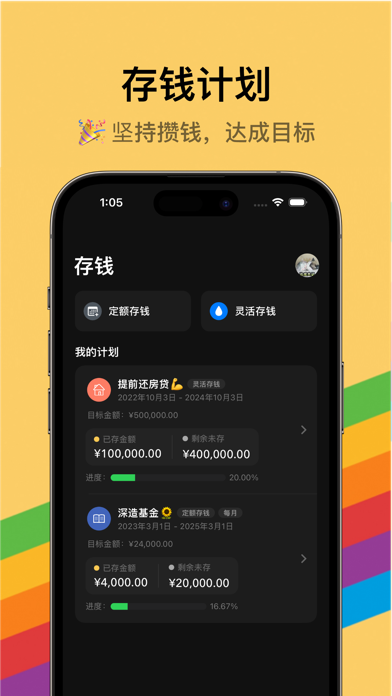
Sampled from 6 of iCost记账-快速简洁好用的记账理财助手&记账软件's App Store screenshots — background, accent and theme, measured by LaunchShots (not something Apple publishes).
#FCCC64 bg
#DDB358
#5CBC44 accent
#111111 text
Screenshots




iPad screenshots


Icon palette
About this app
# AppStore 编辑推荐 # AppStore 热搜推荐 感谢您的喜欢,如果您认同我们的方向,又或者认可我们的努力,请帮助我们将 iCost 推广出去。感激不尽。 如果使用过程中出现任何问题,可以发送邮件到 feedback@quji.tech 进行反馈,您的每一个建议都会得到慎重的考虑。 【简介】 iCost 是一款简洁高效的记账软件。旨在提高您日常生活中记账的效率,帮助您更轻松的管理财务状况和养成健康的消费习惯。 我们承诺不会使用您的数据。 【功能介绍】 - 快速记账:极简的操作流程,可高效完成每一笔记账操作; - 分类管理:支持二级分类,可自定义添加和修改记账分类,丰富多样; - 资产管理:提供多种资产类型,支持资产添加/隐藏/归档/排序,方便您轻松掌握财务状况; - 图表分析:支持多种维度的账单统计,各类趋势了如指掌; - 数据备份:全自动 iCloud 云端备份,保护您记账数据的安全; - 账单导出:支持导出记账数据,便于 Excel 编辑; - 账单导入:支持 30+ 记账平台的数据导入,方便您迁移数据; - 截图导入:支持导入支付宝/微信/云闪付的账单列表页截屏进行记…
App details
What you can learn from iCost记账-快速简洁好用的记账理财助手&记账软件
Every shipping app on the App Store has gone through the same decisions you're working through right now: which screenshot goes first, what caption sits over it, which device frame to show, what color the background should be. The 12 screenshots above are iCost记账-快速简洁好用的记账理财助手&记账软件's answers to those questions — they're public, they're real, and they made it through Apple's review.
What the numbers say: iCost记账-快速简洁好用的记账理财助手&记账软件 runs a light set with one background colour (#FCCC64) carried across every screenshot — the listing reads as a single poster when the shots sit side by side in search results. The accent colour we picked up, #5CBC44, is the one to reuse for badges, arrows and highlighted words if you borrow this look. Hit Use this style to open the editor with these exact colours and drop your own screenshot in.
Notice the first screenshot in particular. It's the one users see in search results and on the product page, and it's where most apps spend their best caption and tightest design. Look at the proportion of background to phone, where the text sits, what one thing the image is trying to communicate.
Want to see how other Finance apps approach the same problem? Browse more Finance apps in the showcase.
Take what works into your own screenshots
Open LaunchShots and design your App Store & Google Play screenshots — pick a device frame, drop captions, ship in minutes. Free, in your browser.
Open the screenshot editor →Apps with a similar look
Closest background + accent colours among the listings we've analysed — useful when you want to see the same palette handled by a different team.