Chart position — tracked daily by LaunchShots
Screenshot changes — detected by LaunchShots
Screenshot style breakdown
Sampled from 6 of GOLFZON Global's App Store screenshots — background, accent and theme, measured by LaunchShots (not something Apple publishes).
#040404 bg
#272727
#64C4EC accent
#FFFFFF text
Screenshots


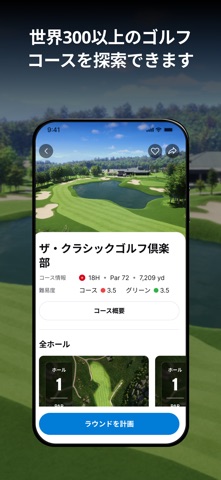

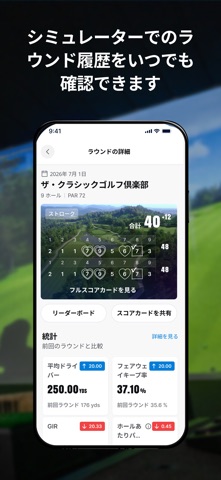

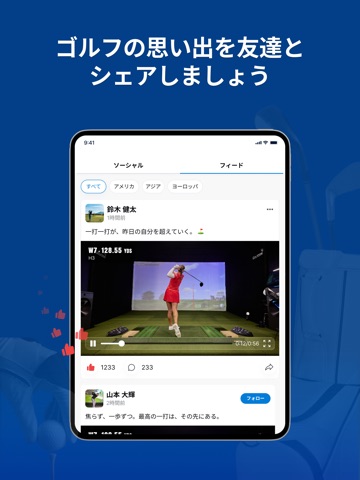
iPad screenshots




Icon palette
About this app
GOLFZON Globalアプリが全面リニューアルされました。 ラウンドの合間もゴルフ体験が途切れることなく、あなたのプレーに関するさまざまな機能が一つのアプリにつながります。 来店前にラウンドを計画したり、練習場でショットのばらつきを確認したり、世界中のGOLFZON設置店舗で友達と一緒にプレーしたりできます。また、詳細なコースマップを見ながら、各ホールの情報を確認することもできます。 新しくなったGOLFZONアプリが、あなたのゴルフをしっかりサポートします。 年間6,500万回以上のラウンドを楽しむ、300万人を超えるGOLFZONメンバーのコミュニティに参加しましょう。 【主な機能】 新しいGOLFZONアプリでは、以下の機能をご利用いただけます。 - 「Round Planner」で、来店前にシミュレーターでのラウンドを計画し、友達を招待できます。 - 「Track Progress」で、クラブごとのショットのばらつきを視覚的に確認できます。 -「Network Play」を利用して、別のGOLFZON設置店舗にいる友達とも一緒にプレーできます。 - シミ…
App details
What you can learn from GOLFZON Global
Every shipping app on the App Store has gone through the same decisions you're working through right now: which screenshot goes first, what caption sits over it, which device frame to show, what color the background should be. The 16 screenshots above are GOLFZON Global's answers to those questions — they're public, they're real, and they made it through Apple's review.
What the numbers say: GOLFZON Global runs a dark set where the background shifts from screenshot to screenshot (first shot #040404) — each image has to stand on its own, so the captions carry more of the story. The accent colour we picked up, #64C4EC, is the one to reuse for badges, arrows and highlighted words if you borrow this look. Hit Use this style to open the editor with these exact colours and drop your own screenshot in.
Notice the first screenshot in particular. It's the one users see in search results and on the product page, and it's where most apps spend their best caption and tightest design. Look at the proportion of background to phone, where the text sits, what one thing the image is trying to communicate.
Want to see how other Sports apps approach the same problem? Browse more Sports apps in the showcase.
Take what works into your own screenshots
Open LaunchShots and design your App Store & Google Play screenshots — pick a device frame, drop captions, ship in minutes. Free, in your browser.
Open the screenshot editor →Apps with a similar look
Closest background + accent colours among the listings we've analysed — useful when you want to see the same palette handled by a different team.