Chart position — tracked daily by LaunchShots
Screenshot style breakdown
Sampled from 4 of 鱼跃安耐糖's App Store screenshots — background, accent and theme, measured by LaunchShots (not something Apple publishes).
#FCFCFC bg
#DDDDDD
#7CCC0C accent
#111111 text
Screenshots


Icon palette
About this app
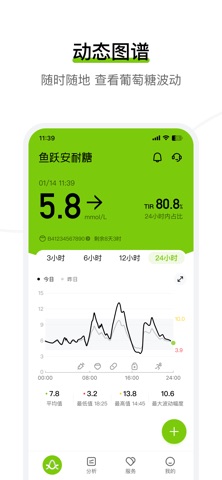
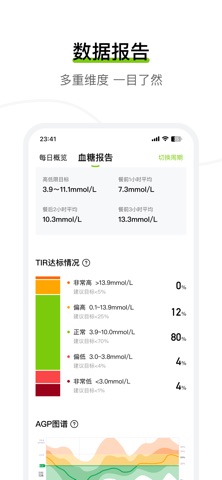
鱼跃安耐糖应用程序(APP)旨在与安耐糖Anytime传感器、发射器结合使用,用于测量糖尿病患者或其它需要监测葡萄糖变化趋势的18岁及以上人群的葡萄糖水平。在按照产品使用及技术说明书佩戴安耐糖Anytime传感器及连接APP后,可持续采集葡萄糖数值形成连续的葡萄糖动态监测图谱。鱼跃安耐糖应用程序(APP)不单独销售。 【动态监测图谱】通过持续采集传感器的葡萄糖数值,形成连续的葡萄糖曲线。可实时查看当前的葡萄糖数值、趋势和历史记录; 【事件记录】可随时随地添加记录,跟踪饮食、服药、胰岛素使用情况和运动情况; 【数据报告】查看报告,如目标范围内的时间、血糖全景图、24小时重叠图、高低血糖区域图等,并可以一键分享; 【产品咨询】APP中提供在线咨询、电话咨询两种咨询方式,安耐糖产品顾问将为用户解答产品在佩戴和使用过程中遇到的各类问题; 【提醒方式】APP中提供高低血糖提醒、异常问题提醒等,提醒方式有系统消息、弹框、语音播报等形式,可以根据自身需求设置。 注意事项: - APP内提供的葡萄糖数据分析建议仅供参考,不适于医疗用途,如有不适…
App details
What you can learn from 鱼跃安耐糖
Every shipping app on the App Store has gone through the same decisions you're working through right now: which screenshot goes first, what caption sits over it, which device frame to show, what color the background should be. The 4 screenshots above are 鱼跃安耐糖's answers to those questions — they're public, they're real, and they made it through Apple's review.
What the numbers say: 鱼跃安耐糖 runs a light set with one background colour (#FCFCFC) carried across every screenshot — the listing reads as a single poster when the shots sit side by side in search results. The accent colour we picked up, #7CCC0C, is the one to reuse for badges, arrows and highlighted words if you borrow this look. Hit Use this style to open the editor with these exact colours and drop your own screenshot in.
Notice the first screenshot in particular. It's the one users see in search results and on the product page, and it's where most apps spend their best caption and tightest design. Look at the proportion of background to phone, where the text sits, what one thing the image is trying to communicate.
Want to see how other Medical apps approach the same problem? Browse more Medical apps in the showcase.
Take what works into your own screenshots
Open LaunchShots and design your App Store & Google Play screenshots — pick a device frame, drop captions, ship in minutes. Free, in your browser.
Open the screenshot editor →Apps with a similar look
Closest background + accent colours among the listings we've analysed — useful when you want to see the same palette handled by a different team.