Chart position — tracked daily by LaunchShots
Screenshot changes — detected by LaunchShots
Screenshot style breakdown
Sampled from 6 of ルナルナ おくすり便 -ピル処方のオンライン診療's App Store screenshots — background, accent and theme, measured by LaunchShots (not something Apple publishes).
#DCECF4 bg
#C1CFD6
#3C9CC4 accent
#111111 text
Reading the caption text from the screenshots in your browser…
Screenshots




Icon palette
About this app
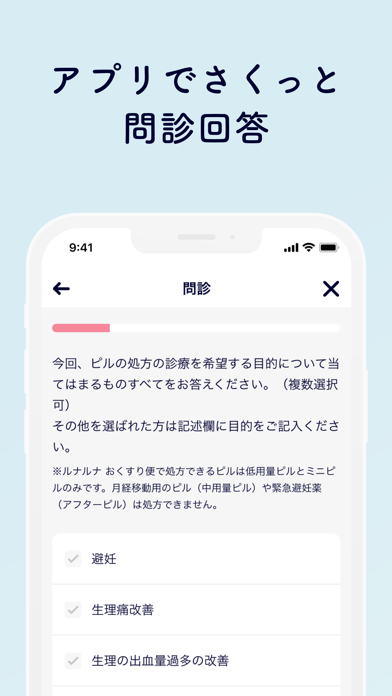
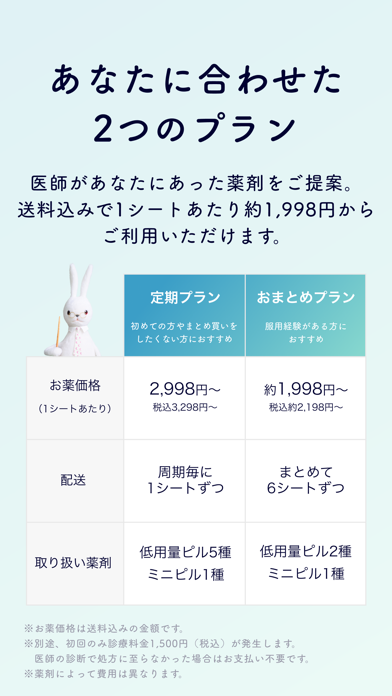
\ルナルナのピル オンライン診療・処方アプリ/ 『ルナルナ おくすり便』は、すきま時間に自宅など好きな場所からオンラインでピル処方が受けられ、処方されたピルはポストに届く、ピルの定期配送サービスアプリです。 □ピル処方に必要な診療がスマホひとつで完結! □提携先の医師が、あなたの症状やお悩みにあったピルを処方 □最短当日発送!中身がわからないようにピルをポストにお届け □シンプルで続けやすい料金プラン、途中キャンセルもOK □初めてのピルでも安心!ピルの基本や、服用中のお困りごともサポート! -------------------------- 【ピルお届けまでの流れ】 ◆アプリで問診に回答 ピル処方のための問診に回答いただきます。回答は医師が受け取り、診療に役立てます。 ◆チャットとビデオでオンライン診療 チャットとビデオ通話で、医師と直接やりとりをしていただきます。ご自宅から受診できるので、待ち時間や他の方を気にすることなく受診いただけます。 あなたのお悩みやピル処方に関して不安なことがあれば、お気軽に医師にご相談ください。 ※…
App details
What you can learn from ルナルナ おくすり便 -ピル処方のオンライン診療
Every shipping app on the App Store has gone through the same decisions you're working through right now: which screenshot goes first, what caption sits over it, which device frame to show, what color the background should be. The 7 screenshots above are ルナルナ おくすり便 -ピル処方のオンライン診療's answers to those questions — they're public, they're real, and they made it through Apple's review.
What the numbers say: ルナルナ おくすり便 -ピル処方のオンライン診療 runs a light set with one background colour (#DCECF4) carried across every screenshot — the listing reads as a single poster when the shots sit side by side in search results. The accent colour we picked up, #3C9CC4, is the one to reuse for badges, arrows and highlighted words if you borrow this look. Hit Use this style to open the editor with these exact colours and drop your own screenshot in.
Notice the first screenshot in particular. It's the one users see in search results and on the product page, and it's where most apps spend their best caption and tightest design. Look at the proportion of background to phone, where the text sits, what one thing the image is trying to communicate.
Want to see how other Medical apps approach the same problem? Browse more Medical apps in the showcase.
Take what works into your own screenshots
Open LaunchShots and design your App Store & Google Play screenshots — pick a device frame, drop captions, ship in minutes. Free, in your browser.
Open the screenshot editor →Apps with a similar look
Closest background + accent colours among the listings we've analysed — useful when you want to see the same palette handled by a different team.