Chart position — tracked daily by LaunchShots
Screenshot style breakdown
Sampled from 5 of 单聚多代驾司机端's App Store screenshots — background, accent and theme, measured by LaunchShots (not something Apple publishes).
#1484FC bg
#3495FC
#7CB414 accent
#FFFFFF text
Screenshots


Icon palette
About this app
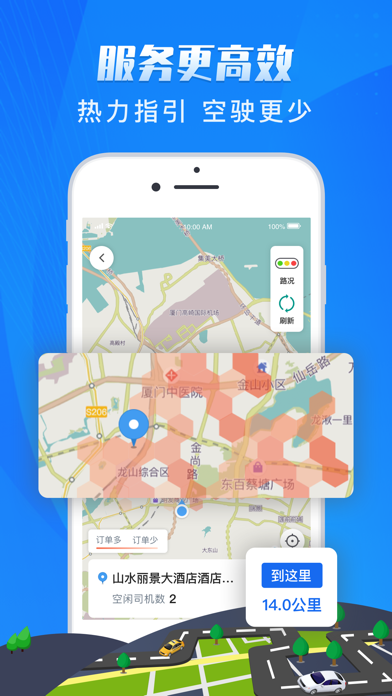
代驾接单,首选单聚多。 单聚多代驾司机端是一款为代驾从业人员定制开发的接单服务平台,汇聚多渠道代驾司机,深受司机师傅信赖。通过单聚多,代驾司机师傅可以实现接单自由。我们将和您一起为每个客户提供更优质、更专业、更贴心的代驾服务体验。 平台优势: 【合规平台 安全保障】平台合规可靠,资金更安全,让司机朋友在工作中拥有足够的安全保障。 【海量订单 接单自由】聚合多平台海量订单,智能匹配更精准,热力指引更高效,接单更自由。 【奖励丰富 活动不断】冲单奖励,流水奖励,新人推荐等更多高额奖励让你轻松月入过万。 【平台垫付 收入无忧】无需主动催付款,平台垫付;支持提现到支付宝,快速到账。 美好生活是需要双手去创造的,多劳多得,期待与您携手走上共同富裕之路!
App details
What you can learn from 单聚多代驾司机端
Every shipping app on the App Store has gone through the same decisions you're working through right now: which screenshot goes first, what caption sits over it, which device frame to show, what color the background should be. The 5 screenshots above are 单聚多代驾司机端's answers to those questions — they're public, they're real, and they made it through Apple's review.
What the numbers say: 单聚多代驾司机端 runs a dark set with one background colour (#1484FC) carried across every screenshot — the listing reads as a single poster when the shots sit side by side in search results. The accent colour we picked up, #7CB414, is the one to reuse for badges, arrows and highlighted words if you borrow this look. Hit Use this style to open the editor with these exact colours and drop your own screenshot in.
Notice the first screenshot in particular. It's the one users see in search results and on the product page, and it's where most apps spend their best caption and tightest design. Look at the proportion of background to phone, where the text sits, what one thing the image is trying to communicate.
Want to see how other Navigation apps approach the same problem? Browse more Navigation apps in the showcase.
Take what works into your own screenshots
Open LaunchShots and design your App Store & Google Play screenshots — pick a device frame, drop captions, ship in minutes. Free, in your browser.
Open the screenshot editor →Apps with a similar look
Closest background + accent colours among the listings we've analysed — useful when you want to see the same palette handled by a different team.