Chart position — tracked daily by LaunchShots
Screenshot changes — detected by LaunchShots
Screenshot style breakdown
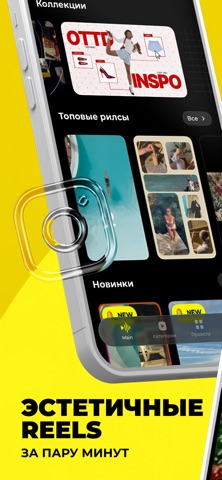
Sampled from 6 of ReelsApp видео - тренды's App Store screenshots — background, accent and theme, measured by LaunchShots (not something Apple publishes).
#FCF41C bg
#DDD618
#349CA4 accent
#111111 text
Screenshots


Icon palette
About this app
Эстетичные Reels за 1 минуту! Создавай трендовые видео, залетай в рекомендации и собирай лайки. Забудь про сложный монтаж — мы всё сделаем за тебя. Просто выбери свои фото или видео, а ReelsApp смонтирует их идеально под музыку! Главные фишки: * 1000+ шаблонов: На любой вайб и идею. Более 50 шаблонов доступны абсолютно бесплатно! * Монтаж точно в бит: Идеальные переходы автоматически подстраиваются под трендовые звуки. * AI-тренды в один клик: Создавай вирусные AI-танцы и невероятные эффекты без сложных промптов. Наша нейросеть сделает всю работу за секунды. * Удобно и быстро: Сохраняй черновики, добавляй любимые темплейты в избранное и создавай контент где угодно. Стань PRO: Оформи подписку, чтобы убрать рекламу, открыть все коллекции и получить бонусные токены для крутых AI-фич. Попробуй бесплатно прямо сейчас! Информация о подписке: PRO-подписка предоставляет доступ ко всем кол…
App details
What you can learn from ReelsApp видео - тренды
Every shipping app on the App Store has gone through the same decisions you're working through right now: which screenshot goes first, what caption sits over it, which device frame to show, what color the background should be. The 6 screenshots above are ReelsApp видео - тренды's answers to those questions — they're public, they're real, and they made it through Apple's review.
What the numbers say: ReelsApp видео - тренды runs a mixed light-and-dark set where the background shifts from screenshot to screenshot (first shot #FCF41C) — each image has to stand on its own, so the captions carry more of the story. The accent colour we picked up, #349CA4, is the one to reuse for badges, arrows and highlighted words if you borrow this look. Hit Use this style to open the editor with these exact colours and drop your own screenshot in.
Notice the first screenshot in particular. It's the one users see in search results and on the product page, and it's where most apps spend their best caption and tightest design. Look at the proportion of background to phone, where the text sits, what one thing the image is trying to communicate.
Want to see how other Photo & Video apps approach the same problem? Browse more Photo & Video apps in the showcase.
Take what works into your own screenshots
Open LaunchShots and design your App Store & Google Play screenshots — pick a device frame, drop captions, ship in minutes. Free, in your browser.
Open the screenshot editor →Apps with a similar look
Closest background + accent colours among the listings we've analysed — useful when you want to see the same palette handled by a different team.