Screenshot changes — detected by LaunchShots
Screenshot style breakdown
Sampled from 6 of DailyVAL's App Store screenshots — background, accent and theme, measured by LaunchShots (not something Apple publishes).
#FCFCF4 bg
#DDDDD6
#FC4454 accent
#111111 text
Reading the caption text from the screenshots in your browser…
Screenshots
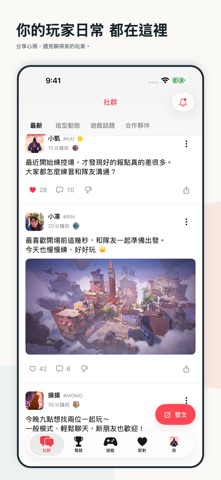

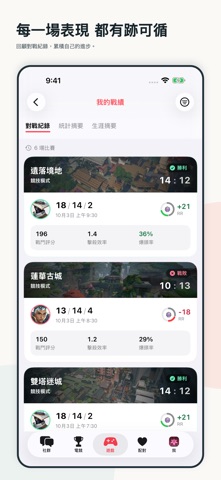
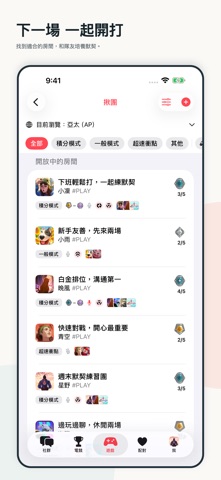


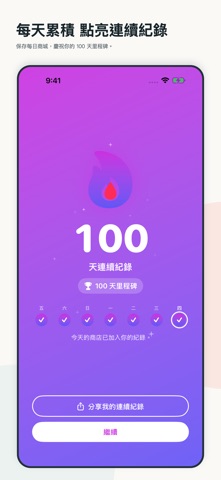
iPad screenshots


Icon palette
About this app
DailyVAL,陪你一起過玩家日常。 從社群交流、電競賽事到實用工具,把你關心的遊戲大小事放在一起。 【找到同好,一起開下一場】 分享動態、參與留言,和玩家交流心得。透過揪團房間尋找隊友,也能參加每日配對,認識一起玩的新朋友。 【追蹤賽事,分享你的觀點】 查看電競賽程與比賽結果,關注喜歡的戰隊和選手。參與社群評分,看看其他玩家如何看待場上表現。 【回顧表現,準備下一場】 查詢玩家戰績與對戰紀錄,了解段位、勝率和爆頭率等數據。瀏覽、收藏準星設定,找到適合自己的選擇。 部分功能需要登入或連結遊戲帳號;Premium 提供額外功能。功能與資料供應情況以應用程式內顯示為準。 使用條款:https://www.apple.com/legal/internet-services/itunes/dev/stdeula/
App details
What you can learn from DailyVAL
Every shipping app on the App Store has gone through the same decisions you're working through right now: which screenshot goes first, what caption sits over it, which device frame to show, what color the background should be. The 20 screenshots above are DailyVAL's answers to those questions — they're public, they're real, and they made it through Apple's review.
What the numbers say: DailyVAL runs a light set with one background colour (#FCFCF4) carried across every screenshot — the listing reads as a single poster when the shots sit side by side in search results. The accent colour we picked up, #FC4454, is the one to reuse for badges, arrows and highlighted words if you borrow this look. Hit Use this style to open the editor with these exact colours and drop your own screenshot in.
Notice the first screenshot in particular. It's the one users see in search results and on the product page, and it's where most apps spend their best caption and tightest design. Look at the proportion of background to phone, where the text sits, what one thing the image is trying to communicate.
Want to see how other Social Networking apps approach the same problem? Browse more Social Networking apps in the showcase.
Take what works into your own screenshots
Open LaunchShots and design your App Store & Google Play screenshots — pick a device frame, drop captions, ship in minutes. Free, in your browser.
Open the screenshot editor →Apps with a similar look
Closest background + accent colours among the listings we've analysed — useful when you want to see the same palette handled by a different team.