Chart position — tracked daily by LaunchShots
Screenshot changes — detected by LaunchShots
Screenshot style breakdown
Sampled from 6 of SynClub: AIキャラ・夢小説・ノベル・チャット・物語's App Store screenshots — background, accent and theme, measured by LaunchShots (not something Apple publishes).
#141414 bg
#343434
#FC8474 accent
#FFFFFF text
Reading the caption text from the screenshots in your browser…
Screenshots




Icon palette
About this app
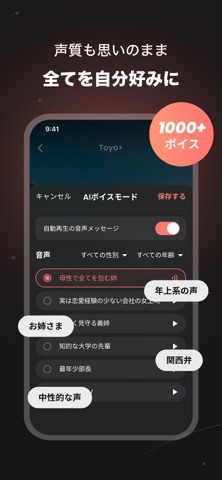
\累計300万DL突破!日本で90万人以上が登録するAIキャラクターアプリ。/ 推しと話して、自分だけの物語をはじめよう。 SynClubは、AIキャラクターとのチャットはもちろん、夢小説・恋愛ノベル・ロールプレイ・なりきりなど、さまざまな物語を楽しめるAIキャラアプリ。 憧れの先輩との恋愛、幼馴染との再会、異世界での冒険、謎に満ちた世界での物語——。好きなキャラクターと会話しながら、あなた自身が主人公となって、世界にひとつだけの物語を楽しめます。 ■ 推しとの物語に入り込める「ノベル・劇場」 ただチャットするだけではなく、キャラクターの表情や行動、シチュエーション、物語の展開まで楽しめる没入型のストーリー体験。 恋愛、学園、ファンタジー、冒険など、さまざまな世界観の中でキャラクターとの物語を楽しめます。 あなたの言葉や選択によって会話や物語が展開。読むだけの小説ではなく、あなた自身が主人公になる夢小説・恋愛ノベル・ストーリー体験を楽しんでください。 ■ 1,000種類以上のボイスで、推しがもっと近くに SynClubでは、1,000…
App details
What you can learn from SynClub: AIキャラ・夢小説・ノベル・チャット・物語
Every shipping app on the App Store has gone through the same decisions you're working through right now: which screenshot goes first, what caption sits over it, which device frame to show, what color the background should be. The 9 screenshots above are SynClub: AIキャラ・夢小説・ノベル・チャット・物語's answers to those questions — they're public, they're real, and they made it through Apple's review.
What the numbers say: SynClub: AIキャラ・夢小説・ノベル・チャット・物語 runs a dark set with one background colour (#141414) carried across every screenshot — the listing reads as a single poster when the shots sit side by side in search results. The accent colour we picked up, #FC8474, is the one to reuse for badges, arrows and highlighted words if you borrow this look. Hit Use this style to open the editor with these exact colours and drop your own screenshot in.
Notice the first screenshot in particular. It's the one users see in search results and on the product page, and it's where most apps spend their best caption and tightest design. Look at the proportion of background to phone, where the text sits, what one thing the image is trying to communicate.
Want to see how other Entertainment apps approach the same problem? Browse more Entertainment apps in the showcase.
Take what works into your own screenshots
Open LaunchShots and design your App Store & Google Play screenshots — pick a device frame, drop captions, ship in minutes. Free, in your browser.
Open the screenshot editor →Apps with a similar look
Closest background + accent colours among the listings we've analysed — useful when you want to see the same palette handled by a different team.