Chart position — tracked daily by LaunchShots
Screenshot changes — detected by LaunchShots
Screenshot style breakdown
Sampled from 6 of Amex Japan's App Store screenshots — background, accent and theme, measured by LaunchShots (not something Apple publishes).
#046CD4 bg
#2780DA
#6C3C2C accent
#FFFFFF text
Screenshots



Icon palette
About this app
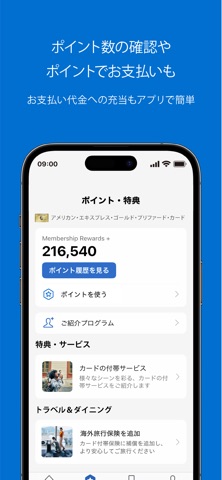
------------------ 主な機能 ------------------ • カードのご利用状況のご確認 保有されているすべてのアメリカン・エキスプレスのカードご利用金額およびご請求金額をご確認いただけます。 • ご利用代金明細書(PDF) PDFにてご利用代金明細書がご確認いただけます。 • ポイントのご確認、ポイントでお支払い 獲得ポイントの確認や、カードご利用後のお支払い代金として、ポイントを充当できます。 • Touch ID/ Face IDでログイン 対応端末をご利用の場合、Touch ID/ Face IDによるログインがご利用いただけます。 安全かつスマートにアプリをご利用いただけます。 • Apple Payに登録 アプリ内から、アメリカン・エキスプレスのカードをApple Payに登録をして、カードレスで簡単・安心にお買い物を。 • プッシュ通知機能 カードご利用金額等のお知らせを、タイムリーにプッシュ通知でお知らせします。 • 新規会員ご紹介プログラム より多くのポイントが貯まる新規会員ご紹介プログラムをワンタッチで簡単にご利用いただけます。 • キャンペーン情報の確認、…
App details
What you can learn from Amex Japan
Every shipping app on the App Store has gone through the same decisions you're working through right now: which screenshot goes first, what caption sits over it, which device frame to show, what color the background should be. The 8 screenshots above are Amex Japan's answers to those questions — they're public, they're real, and they made it through Apple's review.
What the numbers say: Amex Japan runs a dark set with one background colour (#046CD4) carried across every screenshot — the listing reads as a single poster when the shots sit side by side in search results. The accent colour we picked up, #6C3C2C, is the one to reuse for badges, arrows and highlighted words if you borrow this look. Hit Use this style to open the editor with these exact colours and drop your own screenshot in.
Notice the first screenshot in particular. It's the one users see in search results and on the product page, and it's where most apps spend their best caption and tightest design. Look at the proportion of background to phone, where the text sits, what one thing the image is trying to communicate.
Want to see how other Finance apps approach the same problem? Browse more Finance apps in the showcase.
Take what works into your own screenshots
Open LaunchShots and design your App Store & Google Play screenshots — pick a device frame, drop captions, ship in minutes. Free, in your browser.
Open the screenshot editor →Apps with a similar look
Closest background + accent colours among the listings we've analysed — useful when you want to see the same palette handled by a different team.