Chart position — tracked daily by LaunchShots
Screenshot style breakdown
Sampled from 6 of ピクトリンク's App Store screenshots — background, accent and theme, measured by LaunchShots (not something Apple publishes).
#FCFCFC bg
#DDDDDD
#6C442C accent
#111111 text
Screenshots




Icon palette
About this app
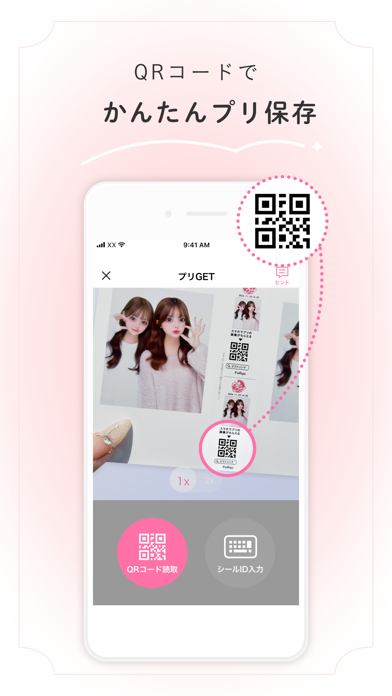
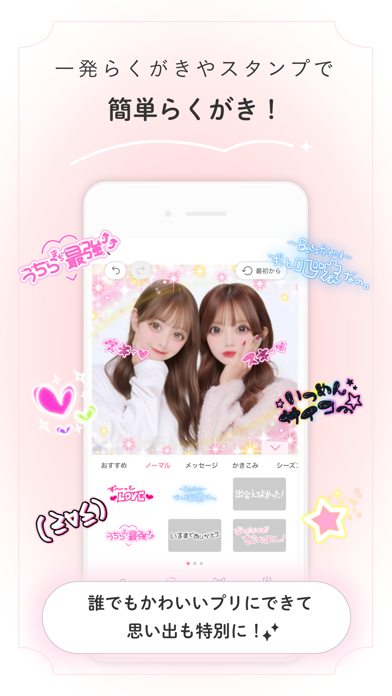
\利用者2,600万人突破!/ フリューのプリントシール機で撮ったプリを らくがき・保存・いつでも見返せる! ◆プリにらくがきできる! プリを撮り終わってもたのしい時間! 一発らくがき・スタンプで誰でも簡単に特別なプリにできるよ! ◆プリ保存が簡単! プリをまとめて保存できる! ◆保存した思い出のプリを見返しやすい! マイページでいつ、何のプリ機で撮ったかを見返せて便利! ※サイトをご利用の方は同じアカウントでログインしてください。 ◆プリ機と連携できる! ピクトリンク連携をすると、今までより簡単・便利で早くプリGETできる! プリ機に表示されるQRコードを読み取ってピクトリンクと連携しよう。 ◆プリをシェアできる! 友達のピクトリンクに直接、高画質のままのプリが送れるよ! ◆プリ情報がチェックできる! ホーム画面で最新のプリ情報やプリ機の設置場所が確認できるよ! プリを撮る前にチェックしてみてね。 ◆サポート対象外端末 iPad端末はサポート対象外です。インストール可能ですが動作保証はしておりません。 ◆…
App details
What you can learn from ピクトリンク
Every shipping app on the App Store has gone through the same decisions you're working through right now: which screenshot goes first, what caption sits over it, which device frame to show, what color the background should be. The 8 screenshots above are ピクトリンク's answers to those questions — they're public, they're real, and they made it through Apple's review.
What the numbers say: ピクトリンク runs a light set with one background colour (#FCFCFC) carried across every screenshot — the listing reads as a single poster when the shots sit side by side in search results. The accent colour we picked up, #6C442C, is the one to reuse for badges, arrows and highlighted words if you borrow this look. Hit Use this style to open the editor with these exact colours and drop your own screenshot in.
Notice the first screenshot in particular. It's the one users see in search results and on the product page, and it's where most apps spend their best caption and tightest design. Look at the proportion of background to phone, where the text sits, what one thing the image is trying to communicate.
Want to see how other Photo & Video apps approach the same problem? Browse more Photo & Video apps in the showcase.
Take what works into your own screenshots
Open LaunchShots and design your App Store & Google Play screenshots — pick a device frame, drop captions, ship in minutes. Free, in your browser.
Open the screenshot editor →Apps with a similar look
Closest background + accent colours among the listings we've analysed — useful when you want to see the same palette handled by a different team.