Chart position — tracked daily by LaunchShots
Screenshot changes — detected by LaunchShots
Screenshot style breakdown
Sampled from 5 of 有道翻译官-107种语言翻译's App Store screenshots — background, accent and theme, measured by LaunchShots (not something Apple publishes).
#F4FCFC bg
#D6DDDD
#1C344C accent
#111111 text
Screenshots

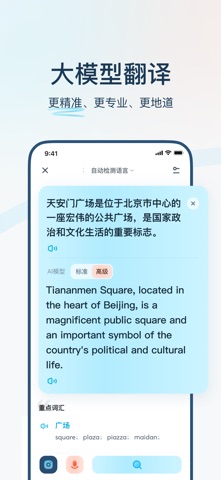


iPad screenshots


Icon palette
About this app
支持107种语言翻译,满足学习翻译、工作翻译、出国翻译、旅游翻译、旅行翻译等需求。支持拍照翻译、语音翻译、同传翻译、实景AR翻译、在线翻译、离线翻译。有道翻译官的中英互译采用业界最先进的有道神经网络翻译引擎技术YNMT,相比传统的机器翻译,翻译准确率显著提升,翻译更准确。学英语用网易有道词典,翻译就用有道翻译官。 【翻译功能】 翻译语种:支持英语、日语、韩语、法语、俄语、西班牙语等107种语言翻译,覆盖186个国家,英语翻译、出国翻译、旅行翻译、旅游购物都不用担心。 离线翻译:支持离线翻译功能的免费词典翻译应用,出国旅游旅行没有网络也能正常翻译英语、日语、韩语、法语、西班牙语、葡萄牙语、越南语等。 AR翻译:实景AR翻译,无需拍照,摄像头扫描即可实时翻译。 同传翻译:流式语音识别,随说随译。 网页翻译:轻松浏览外文网页。 拍照翻译:强大的OCR摄像头取词和拍照翻译功能,一拍即译,无需手动输入便可快速翻译英语、日语等多种语言,满足出国翻译、旅行翻译、旅游购物翻译、英语学习翻译等需求。 文本翻译:输入文本即可翻译,支…
App details
What you can learn from 有道翻译官-107种语言翻译
Every shipping app on the App Store has gone through the same decisions you're working through right now: which screenshot goes first, what caption sits over it, which device frame to show, what color the background should be. The 10 screenshots above are 有道翻译官-107种语言翻译's answers to those questions — they're public, they're real, and they made it through Apple's review.
What the numbers say: 有道翻译官-107种语言翻译 runs a light set with one background colour (#F4FCFC) carried across every screenshot — the listing reads as a single poster when the shots sit side by side in search results. The accent colour we picked up, #1C344C, is the one to reuse for badges, arrows and highlighted words if you borrow this look. Hit Use this style to open the editor with these exact colours and drop your own screenshot in.
Notice the first screenshot in particular. It's the one users see in search results and on the product page, and it's where most apps spend their best caption and tightest design. Look at the proportion of background to phone, where the text sits, what one thing the image is trying to communicate.
Want to see how other Productivity apps approach the same problem? Browse more Productivity apps in the showcase.
Take what works into your own screenshots
Open LaunchShots and design your App Store & Google Play screenshots — pick a device frame, drop captions, ship in minutes. Free, in your browser.
Open the screenshot editor →Apps with a similar look
Closest background + accent colours among the listings we've analysed — useful when you want to see the same palette handled by a different team.