Chart position — tracked daily by LaunchShots
Screenshot style breakdown
Sampled from 5 of 上海银行手机银行's App Store screenshots — background, accent and theme, measured by LaunchShots (not something Apple publishes).
#FCFCFC bg
#DDDDDD
#8CDCFC accent
#111111 text
Reading the caption text from the screenshots in your browser…
Screenshots


Icon palette
About this app
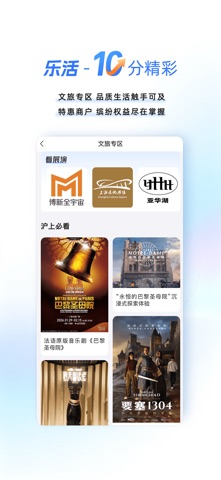
上海银行手机银行APP10.0焕新升级,精彩不凡,智慧随心。 1、财富-10级而上: 多元产品货架 资产配置财富升金 热门资讯 市场行情零距离 2、陪伴-10刻陪伴: 美好生活工作室 线下活动不间断 AI员工 对话即服务 3、安心-10分安心: 乐龄版 焕新升级更温暖 安心付 移动支付有保障 4、乐活-10分精彩: 文旅专区 品质生活触手可及 特惠商户 缤纷权益尽在掌握
App details
What you can learn from 上海银行手机银行
Every shipping app on the App Store has gone through the same decisions you're working through right now: which screenshot goes first, what caption sits over it, which device frame to show, what color the background should be. The 5 screenshots above are 上海银行手机银行's answers to those questions — they're public, they're real, and they made it through Apple's review.
What the numbers say: 上海银行手机银行 runs a light set with one background colour (#FCFCFC) carried across every screenshot — the listing reads as a single poster when the shots sit side by side in search results. The accent colour we picked up, #8CDCFC, is the one to reuse for badges, arrows and highlighted words if you borrow this look. Hit Use this style to open the editor with these exact colours and drop your own screenshot in.
Notice the first screenshot in particular. It's the one users see in search results and on the product page, and it's where most apps spend their best caption and tightest design. Look at the proportion of background to phone, where the text sits, what one thing the image is trying to communicate.
Want to see how other Finance apps approach the same problem? Browse more Finance apps in the showcase.
Take what works into your own screenshots
Open LaunchShots and design your App Store & Google Play screenshots — pick a device frame, drop captions, ship in minutes. Free, in your browser.
Open the screenshot editor →Apps with a similar look
Closest background + accent colours among the listings we've analysed — useful when you want to see the same palette handled by a different team.