Chart position — tracked daily by LaunchShots
Screenshot changes — detected by LaunchShots
Screenshot style breakdown
Sampled from 6 of タッチ!あそベビー's App Store screenshots — background, accent and theme, measured by LaunchShots (not something Apple publishes).
#FC3C3C bg
#FC5757
#0484F4 accent
#FFFFFF text
Screenshots


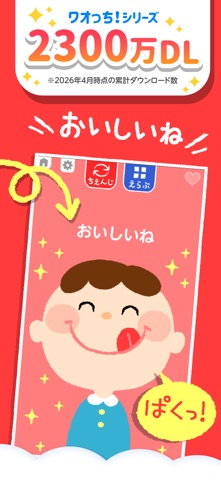


iPad screenshots


Icon palette
About this app
■おかげさまで大人気! シリーズ累計2300万ダウンロード!(2026.4) ■子ども向け・教育カテゴリ無料ランキング1位達成 いろんなものをタッチして、色や形、音の変化を楽しむ、大人気の感覚遊び&ごっこ遊びアプリ! 親子で遊べるゲームでお子さまの好奇心を育む、子供向けのアプリ(知育アプリ)です。 誤タッチを引き起こすバナー広告が無いので、赤ちゃんでも安心して遊べます。 「はじめてたっち」の9個の遊びは、無料で使えます。 【対象年齢】0歳、1歳、2歳、3歳 ◆◆◆アプリの特長◆◆◆ ■夢中になれる遊びがいっぱい ごはん・着替え・歯磨き・料理などの日常の生活や、電車・自動車・お店屋さんなど、 子供たちに身近なことのごっこ遊びを通して、様々なことへの興味関心を育む遊びがいっぱい入っています。 ■タッチだけで遊べる簡単操作 画面をタッチするだけで色や形が変化するので、小さな子供でも楽しく遊べます。 初めてのアプリとしてお使いいただけるよう、操作性を考慮した子供向けのアプリです。 ■サッ!と使えるシンプル設計 アプリの起動からわ…
App details
What you can learn from タッチ!あそベビー
Every shipping app on the App Store has gone through the same decisions you're working through right now: which screenshot goes first, what caption sits over it, which device frame to show, what color the background should be. The 11 screenshots above are タッチ!あそベビー's answers to those questions — they're public, they're real, and they made it through Apple's review.
What the numbers say: タッチ!あそベビー runs a dark set with one background colour (#FC3C3C) carried across every screenshot — the listing reads as a single poster when the shots sit side by side in search results. The accent colour we picked up, #0484F4, is the one to reuse for badges, arrows and highlighted words if you borrow this look. Hit Use this style to open the editor with these exact colours and drop your own screenshot in.
Notice the first screenshot in particular. It's the one users see in search results and on the product page, and it's where most apps spend their best caption and tightest design. Look at the proportion of background to phone, where the text sits, what one thing the image is trying to communicate.
Want to see how other Education apps approach the same problem? Browse more Education apps in the showcase.
Take what works into your own screenshots
Open LaunchShots and design your App Store & Google Play screenshots — pick a device frame, drop captions, ship in minutes. Free, in your browser.
Open the screenshot editor →Apps with a similar look
Closest background + accent colours among the listings we've analysed — useful when you want to see the same palette handled by a different team.