Chart position — tracked daily by LaunchShots
Screenshot changes — detected by LaunchShots
Screenshot style breakdown
Sampled from 6 of IconShop 27's App Store screenshots — background, accent and theme, measured by LaunchShots (not something Apple publishes).
#345C54 bg
#50726B
#2484B4 accent
#FFFFFF text
Reading the caption text from the screenshots in your browser…
Screenshots


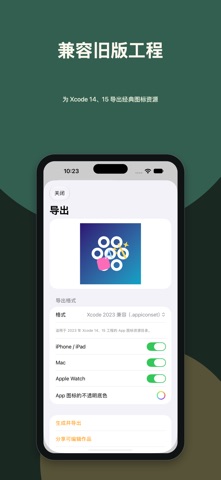
iPad screenshots


Icon palette
About this app
直接在画布上拖动、捏合、旋转,设计属于你的 App 图标。IconShop 27 是适用于 iPhone、iPad 和 Mac 的全新多图层图标工作室。组合 SF Symbols、文字、照片、图片和 SVG 素材,调整颜色、图层顺序、位置、尺寸和角度。 背景支持纯色、线性渐变、角度渐变和透明效果,预览与作品导出使用相同的渲染方式。撤销、重做和本地自动保存,让你专注创作。 为当前 Xcode 导出可在 Icon Composer 中编辑的分层 .icon 文件,或为 Xcode 14、15 导出兼容 2023 年工程的 .appiconset。还支持 PNG、.imageset,以及单独分享可编辑的 .iconshop 作品文件。 无需注册 IconShop 账户。作品保存在本机;系统 iCloud 可用时,可在你自己的设备之间同步。Apple Watch 提供已同步作品的图库。 隐私政策:https://iconshop.aben.io/privacy-policy/ 服务条款:https://iconshop.aben.io/terms/
App details
What you can learn from IconShop 27
Every shipping app on the App Store has gone through the same decisions you're working through right now: which screenshot goes first, what caption sits over it, which device frame to show, what color the background should be. The 12 screenshots above are IconShop 27's answers to those questions — they're public, they're real, and they made it through Apple's review.
What the numbers say: IconShop 27 runs a dark set with one background colour (#345C54) carried across every screenshot — the listing reads as a single poster when the shots sit side by side in search results. The accent colour we picked up, #2484B4, is the one to reuse for badges, arrows and highlighted words if you borrow this look. Hit Use this style to open the editor with these exact colours and drop your own screenshot in.
Notice the first screenshot in particular. It's the one users see in search results and on the product page, and it's where most apps spend their best caption and tightest design. Look at the proportion of background to phone, where the text sits, what one thing the image is trying to communicate.
Want to see how other Lifestyle apps approach the same problem? Browse more Lifestyle apps in the showcase.
Take what works into your own screenshots
Open LaunchShots and design your App Store & Google Play screenshots — pick a device frame, drop captions, ship in minutes. Free, in your browser.
Open the screenshot editor →Apps with a similar look
Closest background + accent colours among the listings we've analysed — useful when you want to see the same palette handled by a different team.