Chart position — tracked daily by LaunchShots
Screenshot changes — detected by LaunchShots
Screenshot style breakdown
Sampled from 4 of MadeYu 寐慾 - AI画像 & 動画生成's App Store screenshots — background, accent and theme, measured by LaunchShots (not something Apple publishes).
#040404 bg
#272727
#7C644C accent
#FFFFFF text
Screenshots


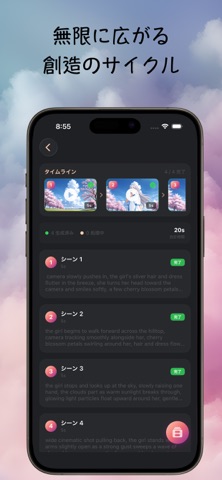
iPad screenshots


Icon palette
About this app
二次元アニメの世界なら、お姉さんもイケメンも、思い描いたキャラは何でも、MadeYuが形にしてみせるよ! MadeYuは、テキストプロンプトや参考画像からAI画像・AI動画を生成できるアプリです。さまざまな画風で思い描いたシーンを形にできます。豊富なリアル系・アニメ系のスタイルから選び、自分のキャラクターを組み込み、複数シーンの動画を1カットずつ組み立てることもできます。 〖全ユーザー〗 -毎日ログイン報酬:通常日5クレジット、サイクル7日目は15クレジット(月約180クレジット)。 -テキストプロンプトから数秒で画像を生成。 –多彩な画風(アニメ系・リアル系)から選択可能。 –クレジットで動画生成も利用可能。 〖Proメンバーシップ〗 -月200クレジットの画像生成枠、広告なし。 -テキストまたは参照画像から「複数サイズ」の画像を生成。 –アニメ系スタイルの豊富なパレットとバリエーション。 –リアル系スタイルの豊富なパレットとバリエーション。 –ログインサイクル7日目に1ダイヤ獲得(5秒動画1本分に相当)。 〖Pro+メンバーシップ〗 -月400ク…
App details
What you can learn from MadeYu 寐慾 - AI画像 & 動画生成
Every shipping app on the App Store has gone through the same decisions you're working through right now: which screenshot goes first, what caption sits over it, which device frame to show, what color the background should be. The 8 screenshots above are MadeYu 寐慾 - AI画像 & 動画生成's answers to those questions — they're public, they're real, and they made it through Apple's review.
What the numbers say: MadeYu 寐慾 - AI画像 & 動画生成 runs a dark set where the background shifts from screenshot to screenshot (first shot #040404) — each image has to stand on its own, so the captions carry more of the story. The accent colour we picked up, #7C644C, is the one to reuse for badges, arrows and highlighted words if you borrow this look. Hit Use this style to open the editor with these exact colours and drop your own screenshot in.
Notice the first screenshot in particular. It's the one users see in search results and on the product page, and it's where most apps spend their best caption and tightest design. Look at the proportion of background to phone, where the text sits, what one thing the image is trying to communicate.
Want to see how other Graphics & Design apps approach the same problem? Browse more Graphics & Design apps in the showcase.
Take what works into your own screenshots
Open LaunchShots and design your App Store & Google Play screenshots — pick a device frame, drop captions, ship in minutes. Free, in your browser.
Open the screenshot editor →Apps with a similar look
Closest background + accent colours among the listings we've analysed — useful when you want to see the same palette handled by a different team.