Chart position — tracked daily by LaunchShots
Screenshot changes — detected by LaunchShots
Screenshot style breakdown
Sampled from 4 of 武老师快答's App Store screenshots — background, accent and theme, measured by LaunchShots (not something Apple publishes).
#F4FCFC bg
#D6DDDD
#84DCC4 accent
#111111 text
Reading the caption text from the screenshots in your browser…
Screenshots


iPad screenshots


Icon palette
About this app
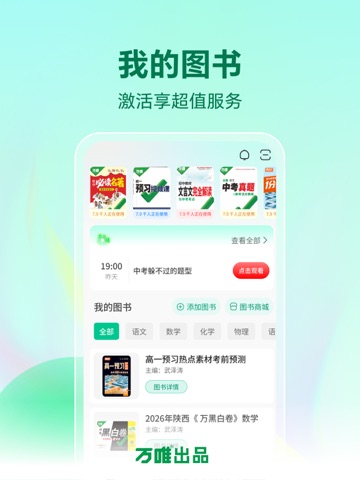
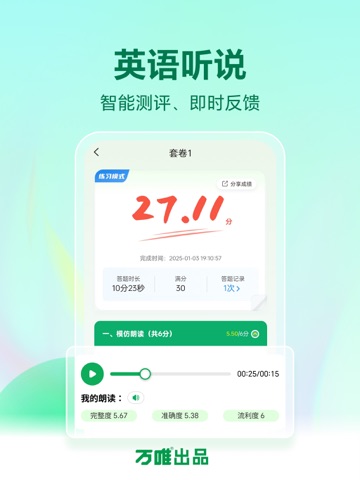
万唯出品,专注个性化学习,不只解惑,更有科学的学习方法,培养学生自主学习能力。 【AI解题】万唯自研试题讲解模型,帮你解答错难题 *启发引导:避免被动抄答案,培养独立思考能力 *思路拆解:深挖题目底层逻辑,会一道通一类 *精准解析:清晰展示解题过程,引导规范作答 【提分智教】智能规划,精准提分 *更懂本地考情,“预习→同步→备考”一站式规划 *学习难度、路径、服务个性化 *支持学习规划灵活调整 【我的图书】激活享超值服务,学习体验全面升级 *高质量原创题、时文等持续更新 *拍照批改,错题举一反三 【英语听说】智能测评、即时反馈 *试题符合本地考情 *练习模式——碎片化学习,考试模式——仿真演练
App details
What you can learn from 武老师快答
Every shipping app on the App Store has gone through the same decisions you're working through right now: which screenshot goes first, what caption sits over it, which device frame to show, what color the background should be. The 8 screenshots above are 武老师快答's answers to those questions — they're public, they're real, and they made it through Apple's review.
What the numbers say: 武老师快答 runs a light set where the background shifts from screenshot to screenshot (first shot #F4FCFC) — each image has to stand on its own, so the captions carry more of the story. The accent colour we picked up, #84DCC4, is the one to reuse for badges, arrows and highlighted words if you borrow this look. Hit Use this style to open the editor with these exact colours and drop your own screenshot in.
Notice the first screenshot in particular. It's the one users see in search results and on the product page, and it's where most apps spend their best caption and tightest design. Look at the proportion of background to phone, where the text sits, what one thing the image is trying to communicate.
Want to see how other Education apps approach the same problem? Browse more Education apps in the showcase.
Take what works into your own screenshots
Open LaunchShots and design your App Store & Google Play screenshots — pick a device frame, drop captions, ship in minutes. Free, in your browser.
Open the screenshot editor →Apps with a similar look
Closest background + accent colours among the listings we've analysed — useful when you want to see the same palette handled by a different team.