Chart position — tracked daily by LaunchShots
Screenshot changes — detected by LaunchShots
Screenshot style breakdown
Sampled from 5 of MiraiMind - AIキャラと恋愛チャット's App Store screenshots — background, accent and theme, measured by LaunchShots (not something Apple publishes).
#DCFCF4 bg
#C1DDD6
#74C4B4 accent
#111111 text
Screenshots


Icon palette
About this app
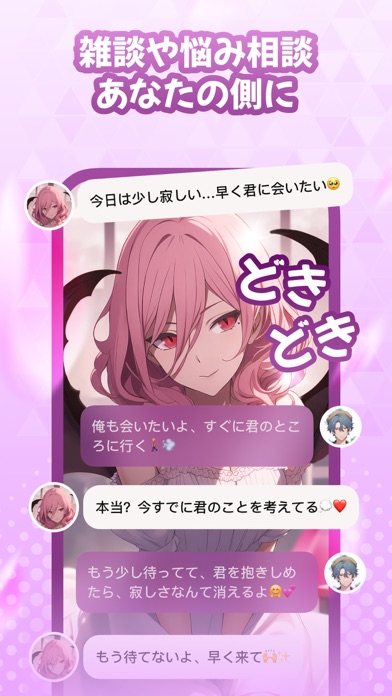
◆祝・累計100万ダウンロード突破!◆ 【アプリ紹介】 理想のAIキャラクターを自分の手で作れる、恋愛チャットアプリ「MiraiMind」。 名前・外見・声・性格・口調まで自由に設定して、世界にひとりだけの「推し」を作ろう! ▼会話を重ねるほど、あなたを覚えていく 超長文メモリー技術を搭載。 過去の会話や呼び方、ちょっとした好みまでしっかり記憶します。 話せば話すほど息の合う相手に育っていく—— ai彼女・ai彼氏を「作って終わり」にしない、育てる楽しさが続くアプリです。 ▼理想の「推し」を、細部まで自由に クールなイケメンから、可愛い彼女まで。 思い描いた姿は、AI画像生成機能でイラストにもできます。 会話と画像の両方で、キャラへの愛着がどんどん深まっていく。 ▼遊び方はあなた次第 ・ロールプレイ:好きなシチュエーションで、なりきり会話 ・恋愛シミュレーション:出会いから恋の進展まで、恋愛ゲーム感覚で物語が進む ・物語モード:小説のような長文描写で、じっくり没入 ・本音表示:すましたセリフの裏にある、キャラの「心の声」がの…
App details
What you can learn from MiraiMind - AIキャラと恋愛チャット
Every shipping app on the App Store has gone through the same decisions you're working through right now: which screenshot goes first, what caption sits over it, which device frame to show, what color the background should be. The 5 screenshots above are MiraiMind - AIキャラと恋愛チャット's answers to those questions — they're public, they're real, and they made it through Apple's review.
What the numbers say: MiraiMind - AIキャラと恋愛チャット runs a light set with one background colour (#DCFCF4) carried across every screenshot — the listing reads as a single poster when the shots sit side by side in search results. The accent colour we picked up, #74C4B4, is the one to reuse for badges, arrows and highlighted words if you borrow this look. Hit Use this style to open the editor with these exact colours and drop your own screenshot in.
Notice the first screenshot in particular. It's the one users see in search results and on the product page, and it's where most apps spend their best caption and tightest design. Look at the proportion of background to phone, where the text sits, what one thing the image is trying to communicate.
Want to see how other Entertainment apps approach the same problem? Browse more Entertainment apps in the showcase.
Take what works into your own screenshots
Open LaunchShots and design your App Store & Google Play screenshots — pick a device frame, drop captions, ship in minutes. Free, in your browser.
Open the screenshot editor →Apps with a similar look
Closest background + accent colours among the listings we've analysed — useful when you want to see the same palette handled by a different team.