Screenshot style breakdown
Sampled from 6 of 捣谷 - 同人谷/追星/OC物料创作平台's App Store screenshots — background, accent and theme, measured by LaunchShots (not something Apple publishes).
#FCECDC bg
#DDCFC1
#FCBC04 accent
#111111 text
Screenshots



Icon palette
About this app
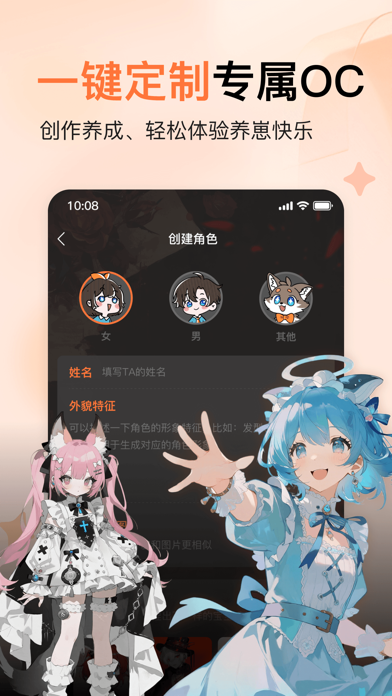
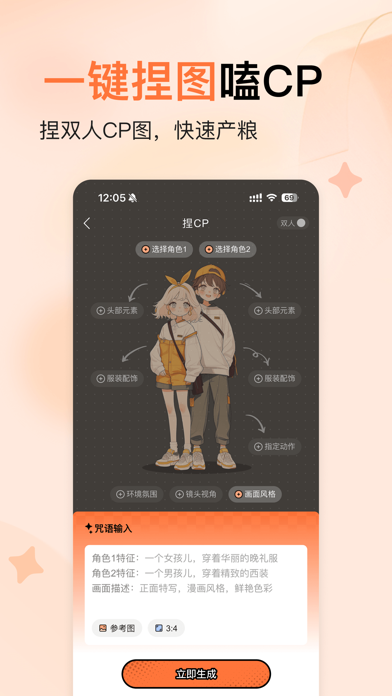
捣谷 - 做谷子就来捣谷 这里有全能又好用的二次元谷子创作集合,从设计交流到实物制作,一站式轻松搞定。 在捣谷,你可以—— 【做谷子】心动谷子即刻开做!百余种模版可选,无料周边轻松产出,从设计到落地,一步实现吃谷自由。 【卖周边】上架你亲手设计的谷子周边,物流售后平台全托管!和同好互相支持、互相吃谷。 【养OC】一键定制你的专属OC形象,让TA不止有模样,还能与你聊天互动,陪你一起成长。 【搞二创】快速、免费制作角色/OC的壁纸、头像、梗图、小漫画、动漫视频等,更多“组合技”等你来探索! 【找同担】把作品分享进社区,和同圈小伙伴一起产粮吃粮,再小的兴趣爱好也要闪闪发光! 重点功能: 【制作谷子】百余种谷子模版,多种类型全覆盖;支持下载印刷图,也可以直接打样制作,想要的谷子立刻拥有。 【谷子市集】集市好谷放心冲!还可以申请成为创作者,你只需专注设计,物流售后平台全托管。 【捏图】几百个角色、数十种风格,快速捏出你的原创角色;捏单人、捏CP——无论烫圈、冷门、白月光还是意难平,你来写剧情。 【捏OC】一键创建专属OC,支持…
App details
What you can learn from 捣谷 - 同人谷/追星/OC物料创作平台
Every shipping app on the App Store has gone through the same decisions you're working through right now: which screenshot goes first, what caption sits over it, which device frame to show, what color the background should be. The 6 screenshots above are 捣谷 - 同人谷/追星/OC物料创作平台's answers to those questions — they're public, they're real, and they made it through Apple's review.
What the numbers say: 捣谷 - 同人谷/追星/OC物料创作平台 runs a light set with one background colour (#FCECDC) carried across every screenshot — the listing reads as a single poster when the shots sit side by side in search results. The accent colour we picked up, #FCBC04, is the one to reuse for badges, arrows and highlighted words if you borrow this look. Hit Use this style to open the editor with these exact colours and drop your own screenshot in.
Notice the first screenshot in particular. It's the one users see in search results and on the product page, and it's where most apps spend their best caption and tightest design. Look at the proportion of background to phone, where the text sits, what one thing the image is trying to communicate.
Want to see how other Graphics & Design apps approach the same problem? Browse more Graphics & Design apps in the showcase.
Take what works into your own screenshots
Open LaunchShots and design your App Store & Google Play screenshots — pick a device frame, drop captions, ship in minutes. Free, in your browser.
Open the screenshot editor →Apps with a similar look
Closest background + accent colours among the listings we've analysed — useful when you want to see the same palette handled by a different team.